


 |
| |
|
|
|
 |
802.11A
Wireless Ethernet Bridge |
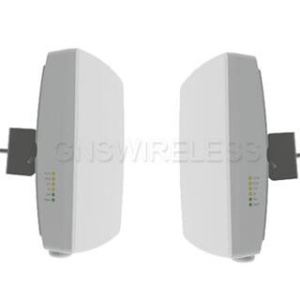
| 802.11A Point to Point Wireless
Ethernet Bridge. Up to 54Mbps Aggregate data
rate. 13dBm transmit power with adjustable
output for closer installations. Integrated
16dBi panel antenna. Includes WEP/WPA/WPA2
Security, Power over Ethernet - Complete Link - 1/2
Mile |
|

Mouse over Picture to View Back Panel. |
|
Part#: |
GNS-1120A |
|
Price: |
Call for Pricing |
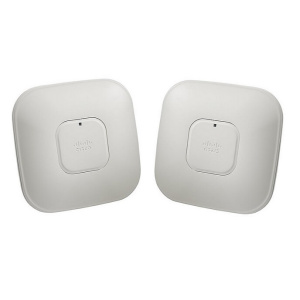
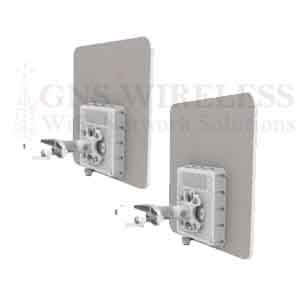
This Wireless Bridge kit
includes Two Outdoor Access
Points, POE & Power supplies.
Features:
AES
ENCRYPTED WIRELESS BRIDGE!
Integrated
16db Internal Antenna
Weather
Proof Enclosure
Carrier
Class QOS with Low Latency
54Mbps
Transfer Rate
POE
and POWER Adapter Included
VoIP Applications
& Streaming
Video.
Low
Latency (Ideal for Video and Voice)
Technical
Specs.
|
|
Basic
Description:
This Point to Point
Wireless Bridge is a low latency link, that includes a pair of
outdoor access points, that have an integrated 16dBi directional
patch antenna built into the enclosure. This means that
only a single, small enclosure is required at each location.
Once the AP's are installed at each location, the Wireless
Bridge operates as a transparent bridge, and will pass all
network traffic between your two locations. The Wireless
Bridge operates similar to an invisible Ethernet cable
connecting your two locations. Each antenna has a beam
width of about 15°, so aligning the antennas is easy.
There are real time signal LED's on the backs of the access
points for alignment assistance, and troubleshooting.
Furthermore, you will have the ability to view real time signal
strength, link quality, and noise level, using the web based
configuration. Each AP has a static IP address, used
strictly for web based configuration, and troubleshooting.
Low latency is required when VoIP or video is being streamed across the
wireless link. For a low latency connection, total packet
delivery time needs to be 100ms or less. For voice
applications, low jitter is also important. Jitter is the
variation in latency, or the difference between the fastest and
slowest packet response times. This wireless link, will
have both qualities, and assuming you have clear line of sight
between the two locations, has a maximum distance of 1/2 mile. Contact us for more information.
Connection to Network:
To connect the access
point to your network at each location, a single Cat5 Ethernet
cable is used. A 50ft. shielded Cat5 cable is included for
each location. (If you need more cable, a maximum length
of up to 250ft. can be used) The Cat5 Ethernet cable
connects directly from the outdoor access point using a
weatherproof grommet, to an indoor POE
(Power-over-Ethernet) injector. The POE injector plugs
into a standard AC outlet for power, and another Cat5 Ethernet
cable connects from the POE injector to your network
(Router/PC/Switch etc.)
At the MAIN location,
you will typically connect to an open LAN port on the back of
your existing router, or switch. At the REMOTE location,
you can connect either directly to a PC if you only have a
single computer, or you can connect to an indoor wired/wireless
router. This will allow you to run multiple computers over
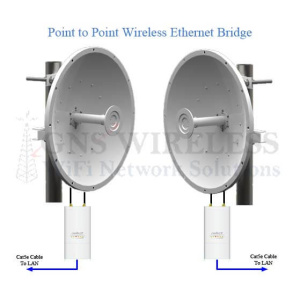
the wireless bridge. See Diagram below.
Maximum Range & Interference:
With clear, un-obstructed line of sight between your two
locations, a maximum range of 1/2 mile can be achieved using
this link. Please note that this Point to Point Wireless
Bridge operates between 5.3-5.8GHz. If you plan on
installing more then one link at the same location, you want to
avoid interference between each Point to Point link by using
separate channels such as CH. 60 (5.3GHz) and CH. 149 (5.7GHz).
Mount the outdoor access points as high as possible to further
avoid any other 5GHz interference.
Each access point has scalable output power.
Power can be scaled back for closer installations to avoid
noise issues and to meet local regulatory requirements.
This Wireless Bridge
is connecting at a frequency above 5GHz, which means if you have
trees or other obstacles in the path of your Point-to-Point
connection, you will still have a strong and solid connection at
short range.
Simply mount the enclosure outside in the direction of your
remote location, connect the cat5 network cable to your LAN, and you're ready for connectivity.
Security Features:
This Wireless Point to Point bridge operates as a transparent
bridge. It is similar to an invisible Ethernet cable
connecting your two locations. It includes multiple
security options including WEP/WPA/WPA2. It also has
ability to enable MAC address authentication so that only the
two access points are able communicate. You can hide the
network SSID, and because the beam width of the antennas is
directional, (about 15°) the signal is not being broadcasted in
all directions, only in the direction you aim the outdoor
antenna. 128 bit AES encryption is included.
If you have any other questions, please contact our
Pre-Sales/Technical Support Dept. at (516) 214-0321.
VLAN Trunking: Typically a switch uses port
based VLANs. This means that whatever is plugged in to
Port X, belongs to whatever Port X is in. Each frame is tagged
with a VLAN tag in the layer 2 header when entering a VLAN
switch port. These frames run across trunk links between two
switches and between a switch and a router. The tag is stripped
down when the frame is sent from the outgoing switch port to the
end device. Remember that the native VLAN frames (by default
VLAN 1 in Cisco and many other devices) are NOT tagged.
When you use a radio link, or wireless
bridge on a VLAN trunk, there are some things to remember:
-
You must use a transparent bridge or the
trunk will be unable to form. Remember, L2.5 bridging
rewrites the layer 2 header. (This bridge operates as
a transparent bridge, when in bridge mode)
-
The radios included in this wireless
bridge (and many other wireless devices) are not switches
and are not VLAN aware. Therefore, tagged frames in the
trunk will be ignored by the devices.
-
The VLAN tag is 4 bytes long. This
means that the maximum Ethernet frame size goes from 1518
bytes to 1522 bytes. Any devices on the trunk link needs to
be able to pass these frames. This Wireless Bridge, with up
to date firmware can pass VLAN tagged frames.
|
 |
For additional protection from
surges, or other surge induced electricity that
may travel through the Ethernet
cable, please use the 300SS
surge protector.
Indoor/Outdoor Canopy
Surge Protector
Part#: 300SSB
Price: $32.99 |
|
Ask us about
pre-configuration of these Access Points, so
they work "out of the box" and ready to
install at your two locations.
Features at a
glance
-
More Robost
Routing Features: Includes Tunneling Protocol
Support, which will allow you to pass through VPN clients,
as well as use tunneling protocols such as VPN, PPTP, RSA
and others.
-
All New Access
Point Features: WDS will allow this Outdoor Access
Point to be wirelessly connected to other Access Points,
while still servicing clients. (Wireless Distribution
System)
-
Wi-Fi
Protected Access (WPA): Wireless Protected Access
improves on the security features of WEP. It includes
improved data encryption and user authentication, and AES
Encryption.
-
All New Client
Adapter Features: With this Outdoor Access Point,
you will be able to align your client and point-to-point
installations without having to log into the radio.
You will get visual signal strength at a glance by using
this great new feature, using the alignment LED's located on
the back of the Access Point.
-
Controllable
High Gain Output: Both radios have 13dBm maximum
output. This works great for long distance
Point-to-Point applications, as well as Client applications.
Power can be scaled back for closer installations to avoid
noise issues and to meet local regulatory requirements.
-
Wireless
Security: WEP, WPA wireless security is included
in this wireless backhaul. This will encrypt the data
being sent between the connection. Also included in
this wireless backhaul is AES encryption, which is a higher
level security feature then standard WEP/WPA. The two
radios can also be configured in PXP mode, which enables
only the two outdoor access points to communicate with each
other, avoiding any other access to the network. The
wireless bridge operates seamlessly as a Wireless Bridge
between your two locations.
-
Wireless
Interference: This wireless Ethernet Bridge is
operating at 5GHz. At most locations, this frequency
is used less frequently then the standard 802.11b/g, so
interference is usually minimized. If you experience
interference at this frequency, check that your antennas are
not mounted directly on a metal surface, have line of sight
between each other, and try changing the channel to one that
is available . You may also want
to move to a 802.11b/g, 2.4GHz wireless bridge. Click here
for an 802.11b/g wireless bridge.
Technical Specs.
|
ACCESS POINT
Specifications (MAIN) |
|
Radio |
IEEE 802.11a |
|
Transmit Power |
13dBm |
|
Frequency Band |
5.170 - 5.805GHz |
|
Receive Sensitivity |
-73dBm
@ 54Mbps, -85dBm @ 6Mbps |
|
Antenna |
16dBi
Integrated Patch Directional |
|
Encryption: |
WEP, WPA, AES, TKIP |
|
Dimensions: |
10" x 9" (Antenna Only) |
|
Weight: |
2lbs |
|
Power Consumption: |
350mA at 12V DC |
|
Operating Temperature: |
-55 deg C to 55 deg C |
|
Radio Mode: |
AP/Point to Point/Client |
|
CLIENT
Specifications (REMOTE) |
|
Radio |
IEEE 802.11a |
|
Transmit Power |
13dBm |
|
Frequency Band |
5.170 - 5.805GHz |
|
Receive Sensitivity |
-73dBm
@ 54Mbps, -85dBm @ 6Mbps |
|
Antenna |
16dBi Integrated Patch Directional |
|
Encryption: |
WEP, WPA, AES, TKIP |
|
Range: |
1/2 mile (conservative estimate) |
|
Dimensions: |
10" x 9" (Antenna Only) |
|
Weight: |
2lbs |
|
Power Consumption: |
350mA at 12V DC |
|
Operating Temperature: |
-55 deg C to 55 deg C |
|
Radio Mode: |
AP/Point to Point/Client |
| |
Specifications are subject to change without
notice.
Subject to local regulations.
|
|
|
|
| |
|
|
Real Time Signal Strength
Meter: Once the
Wireless Link is established
between your two locations,
you will be able to log into
the web interface of the AP
and view real time noise and
signal strength levels.
This will allow you to
adjust the antennas
accordingly and make any
necessary changes required
in order for your wireless
link to operate at its
fullest potential.
The
image to the right is an
example of the Noise and
Signal levels that will
allow you to monitor the
Wireless Bridge.
SNR = Noise (dBm) - Signal (dBm) |
 |
|
View
Point to Point Wireless Installation Diagram
Below:

NOTE:
Linksys routers and universal antenna mounts
are for illustration purposes only and are
not included in the bridge package.
|
Please Note: The wireless bridge
kits listed on this page may also be
referred to as 802.11 bridge
802.11 Ethernet bridge, 802.11g
wireless bridge, belkin wireless
bridge, d link wireless bridge ,
dlink wifi repeater, dlink wireless
bridge, Ethernet bridge router,how
to wireless bridge, internet
wireless bridge, Linksys point to
point wireless , Linksys wifi
bridge, Linksys wifi repeater, long
range wifi bridge, long range
wireless Ethernet bridge, netgear
network bridge, netgear wireless
bridge, netgear wireless network
bridge, outdoor access point bridge,
outdoor Ethernet bridge, outdoor
wifi bridge, outdoor wireless access
point, outdoor wireless bridges,
outdoor wireless Ethernet bridge,
outdoor wireless point to point,
point to multipoint bridge, point to
point Ethernet bridge, point to
point network connection, point to
point router, point to point wifi
bridge, point to point wireless
bridging, point to point wireless
connection, point to point wireless
Ethernet, point to point wireless
internet, point to point wireless
networks, secure wireless bridge,
set up wireless bridge, setting up
wireless bridge, wifi bridge router,
wifi client bridge, wireless access
point bridge, wireless bridge access
point, wireless bridge antenna,
wireless bridge connection, wireless
bridge kits, wireless bridge point
to multipoint, wireless bridge
router, wireless bridge setup,
wireless bridge wds, wireless lan
bridge, wireless network bridge
Ethernet, wireless network bridge,
wireless networking bridge, wireless
repeater bridge, wireless to
wireless bridge, 5GHz point to point
wireless backhaul, T1 replacement
wireless bridge, T1 point to point,
Fiber wireless backhaul. |
|
RELATED
MOUNTING HARDWARE:
|
|
 |
*RECOMMENDED
Universal Antenna Mount
Easy Installation for all Antennas
Part#: GNS-1433
Price: $27.99
.................................... |
|
|
Click
for More Info.
|
|
|
.................................... |
|
|
 |
3 foot
Antenna Tripod
Requires min. 5ft. Mast
Part#: GNS-1631
Price: $44.99
....................................
Click
for More Info.
.................................... |
|
|
 |
12"
Wall Mount Bracket
Great for when eve of build-
ing is in the way of antenna.
Part#: GNS-1633
Price: $22.99
.................................... |
|
|
Click
for More Info.
|
|
|
.................................... |
|
|
Ask us about
pre-configuration of these Access Points, so
they work "out of the box" and ready to
install at your two locations. |
|
|
|
|
|
| |
|
|
|
 |