
The Network Worked Midweek, Then Fell Apart on Weekends
The customer had a familiar problem: once the campground filled up, speeds dropped, devices struggled to stay connected, and complaints started coming in. This was not just an internet provider issue. It was a network design issue.
Too much of the property was depending on too few access points, the existing router was not built for the traffic load, and there was not enough control over how bandwidth was being shared.
Common Causes of Campground WiFi Congestion
Too Few Access PointsLarge outdoor areas were being covered by too few devices, leaving some zones weak and others overloaded. | Weak Network HardwareThe router could not efficiently manage the number of clients connecting during peak occupancy. | No Real Bandwidth ControlA small number of users could consume too much of the available capacity, dragging down performance for everyone else. |
Poor Placement StrategyCoverage was not built around how guests actually move and connect throughout the campground. | Line-of-Sight ChallengesSome areas had clear paths for 60 GHz bridges, while others needed 5 GHz links to work around obstructions. | No Easy Path to ExpandThe older design was not flexible enough to add coverage where demand had increased over time. |
What the Upgrade Plan Actually Looked Like
We started with the satellite image, reviewed where power was available, and created a new heat map to determine where additional access points would have the biggest impact. Then we built the backhaul plan around what the property allowed.
Example Campground WiFi Coverage Zones
We typically begin heat map planning with a 125-foot radius per access point, then expand or refine coverage based on obstacles, layout, and user demand.
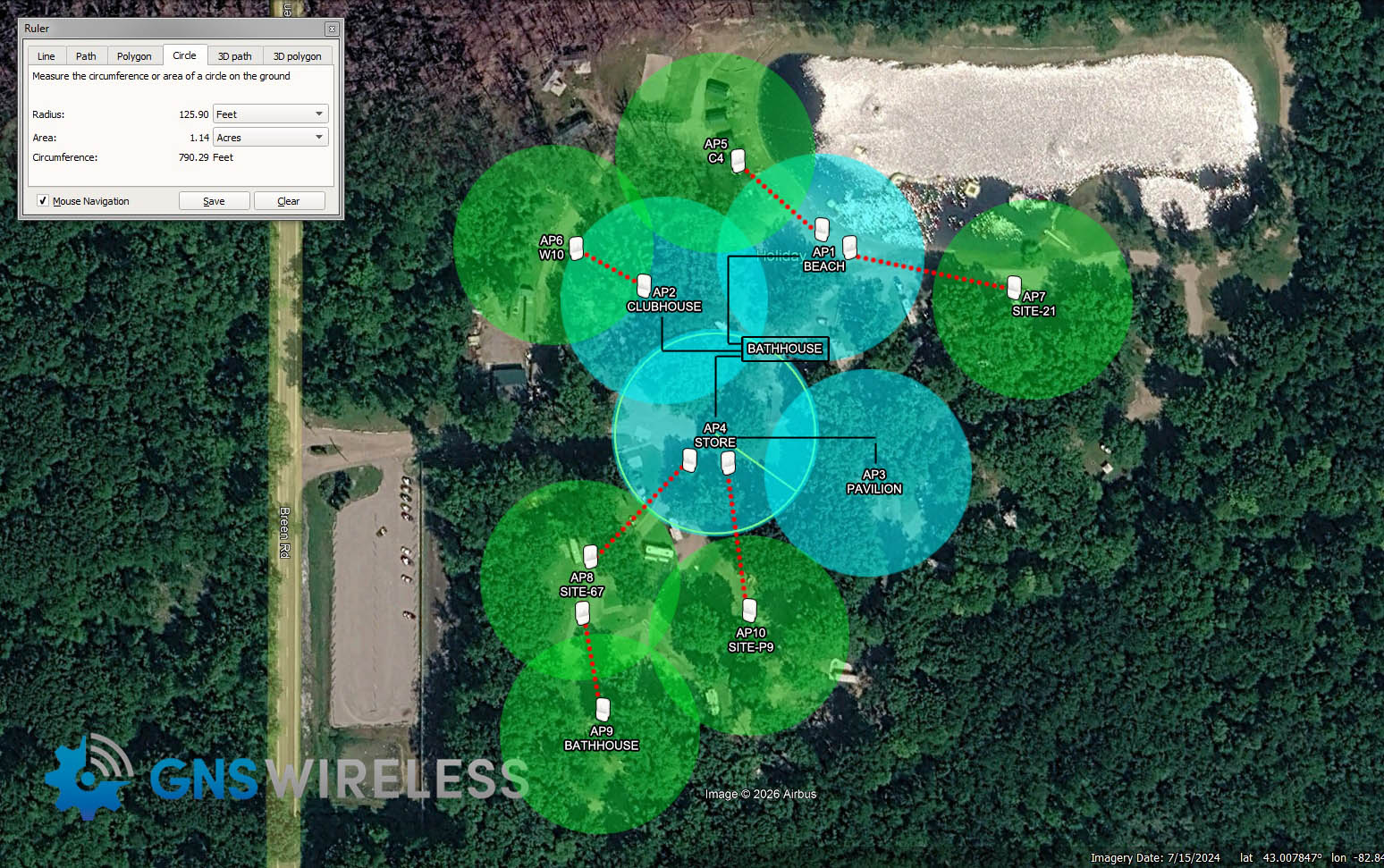
- High-demand weekend zones: prioritized first so guest complaints could be reduced quickly.
- Power-available poles: used to add access points without over-complicating installation.
- 60 GHz links: used where clean line of sight made high-speed backhaul possible.
- 5 GHz links: used in more difficult areas where a direct path was not realistic.
How We Rebuilt the Network
1. Reviewed the Satellite Layout
We mapped out problem zones, available power, and where guests were actually trying to connect.
2. Added More Access Points
Instead of trying to stretch signal farther, we moved WiFi closer to the users.
3. Upgraded to a More Commercial-Grade Router
The network core was strengthened so it could support more connected users at peak times. Cloud based 7003-9P Router is a solid performer.
4. Adjusted Bandwidth in the Cloud
We used bandwidth controls to stop a few users from overpowering the rest of the campground.
5. Built the Backhaul Properly
60 GHz where possible, 5 GHz where necessary, based on what the property layout would realistically support.
Better Design Beat Throwing More Internet at the Problem
A lot of campground owners assume the answer is simply buying more bandwidth from the ISP. Sometimes that helps, but many times the real issue is poor distribution across the property.
By improving access point density, upgrading the router, and controlling how traffic was shared, the network became much more efficient. The result was not just better speed tests. It was better real-world user experience.
- More usable signal where guests actually connected
- Better handling of peak occupancy
- Smoother streaming and browsing
- More room to expand the network later
The Hardware Strategy Behind the Upgrade
More Outdoor Access PointsPlaced where users needed them most, especially in high-density weekend usage zones. Use Wi-Fi 7 Access Points for the fastest speed. | Commercial-Grade RouterA stronger routing platform allowed more users to connect without the network choking under load. These multi-WAN Gigabit routers work great: TLER707. | Cloud Bandwidth ControlsFair usage settings helped balance traffic and prevent a few devices from dragging down everyone else. |
60 GHz Bridge LinksUsed for high-speed backhaul where direct line of sight between locations was available. Best option for short range is the GNS-5660. | 5 GHz Extension LinksUsed to extend the network to harder-to-reach areas where line of sight was not ideal. For less than 500ft., we use the GNS-1183AC kit. | Heat Map PlanningUsed to avoid guessing and place new coverage exactly where it would have the biggest return. |
The End Result Was More Than Just Better Speed
What mattered most was not one isolated speed test. It was the overall experience across the property when occupancy was high.
| More coverage across weak areas that were previously under-served. | More simultaneous users connected without the network bogging down. | Faster real-world performance during busy weekend periods. | Fewer guest complaints and a much more stable user experience. |
Questions Campground Owners Often Ask
Why does campground WiFi get worse on weekends?
Because more users connect at once, and weak network design problems become much more obvious under load.
Do I always need more internet bandwidth?
Not always. Often the bigger issue is how bandwidth is distributed and whether there are enough properly placed access points.
When should I use 60 GHz instead of 5 GHz?
Use 60 GHz where line of sight is clean and speed is critical. Use 5 GHz where the property layout makes a direct path harder to maintain.
Need to Upgrade a Slow Campground WiFi Network?
If your network works midweek but struggles once the campground fills up, we can help review the layout and recommend a cleaner, more scalable design.
- Send a satellite image or campground map
- Show where the internet enters the property
- Mark the areas with complaints or poor service
- Tell us where power is already available