
Statistics indicate that less than 20% of computer users are desktop bound, the greater percentage of internet users are mobile. This dictates a need for accessibility as users move around inside a building, between job sites, on the road, even on campus. Mobile workers use portable technology such as laptops, PDAs, and Smartphones, and gain access through apps and related networks to support their mobility. Wireless LANs, more commonly known as WiFi, has evolved to meet this need. Realizing that wired technology will no longer suffice, many businesses have transitioned to wireless networks. If your business has been slow to adapt, GNS Wireless presents some information to assist in your decision-making process.
WLAN Solution Provides Cost-Effective Network Transition, Operations, and Management
First, factor initial component costs, their installation, and ongoing support. The initial costs for the network will be based on the size and location of an office, and the number of employees, each requiring voice and data to their computer. Again, statistics indicate a yield of up to 90% savings on capital and support costs when installing WiFi over upgrading a wired network. Future expenses experienced with wired networks, such as moves, additional computers and other miscellaneous changes are virtually non-existent with a WLAN. This is because wireless networks are designed to seamlessly support users, who are anticipated to be constantly on the move.
Wireless Networks are More Secure
While not initially the case, WLANs now have bolstered authentication and encryption which allows the network to identify users and their devices, and to apply security policies based on authentication. These policies can include the time and the location from which connection seeks to be established, among other factors. For solid advice as to the best wireless network system for any business, contact the professionals at GNS Wireless. Our staff will listen to your business requirements and recommend the best WiFi network solution to suits your business and your budget. Speak with us at (877) 209-5152, or submit your request via our contact form.
More offices are switching to WiFi to conduct their business, citing its cost-effectiveness and efficiency. When shopping for a wireless solution, however, most business owners will need a little guidance to identify their network needs and connect them with the right wireless solution. The experts at GNS Wireless offer the following tips so that business owners are aware of some of the most important questions to consider before making their WiFi equipment purchase.
Routers
Small businesses seeking reliable wireless service, will be fine with a standard consumer-grade router. One router will provide a signal strong enough to cover roughly a 2,000-square foot, two-story office. Standard routers will provide up to four Ethernet ports that allow businesses to hardwire their computers directly into the network, or connect extra components including printers, network storage, or any additional access points.
To provide adequate service to a larger company, there are two options- a VPN Router or a UTM Gateway or Firewall.VPN stands for Virtual Private Network and is used for both wireless networks and Ethernet-only networks. Ethernet-only can be adapted for WiFi but requires additional access points. These VPN routers are integrated with a VPN server and usually provide users with advanced features including VLAN (virtual LAN– a broadcast domain that is partitioned in a computer network within a Local Area Network) support and multiple SSIDs (SSID stands for service set identifier– it is used to identify a wireless network, like an IP address). Unified Threat Management Gateways offer advanced features and are generally designed as Ethernet-only. These devices offer virus and malware protection in addition to acting as your router and internet gateway. UTM Gateways are ideal for large businesses with security as a core component of their operations.
Access Points
Many companies allow their employees to use their own laptops and mobile devices for business. The increase in Bring Your Own Device (BYOD) systems has spawned a need for businesses to provide strong, reliable WiFi to each of those devices. This requirement leaves business owners with the choice to go with a consumer product or one designed just for businesses, which may be further customizable.
Do not over or underbuy. To save money, some small businesses will opt for a consumer-grade model over one that’s specifically designed for business use. Consumer-grade applications often lack the key capabilities needed for heavy business use, such as security and manageability. It’s highly recommended that even smaller businesses opt for enterprise-grade models to ensure that they receive the best service. It is always better to spend more than face the consequences of a possible hacked system later.
Summary
Strength is only one factor to consider when deciding which WiFi equipment to buy for a wireless network. When it is time to upgrade or expand your network, be sure to always buy equipment of the same standard. In other words, do not try to save money by mixing consumer grade with business equipment. In fact, buying equipment of the same wireless standard assists to optimize your network and saves money over time. Also, greater cost does not always mean a better product. Even though business-grade access points might provide you with a more secure wireless signal, don’t let high-cost translate to the highest quality.
Speak with the WiFi equipment professionals at GNS Wireless. We’ll assist you to determine which wireless network components are the right fit for your business needs today and for the foreseeable future. Call us at (877) 209-5152. You can also send us an email, if you’d prefer, to support@gnswireless.com.
In recent years, many businesses have moved to the convenience of WiFi. There is little mystery as to what a WiFi system is. Think of it as a radio that is used by computers to access the internet. If WiFi is the radio, then a WiFi antenna is the WiFi card’s speaker. To extend the range of the speakers, upgrade to a bigger antenna. Easy? Not so fast. There are numerous options including Directional Antennas, Omni-Directional, Point-to-Point, and Point to Multi-Point antennas. Which is best for a business depends on individual needs. Business owners who wish to extend the range of their company’s WiFi, however, should not just buy the biggest long-distance WiFi antenna they can afford. As with any technological upgrade, using a long-range WiFi antenna has its pros and cons to consider. Continue reading to find out the pros and cons of using a long-range Wi-Fi wireless antenna, like the GNS-1685-AX.
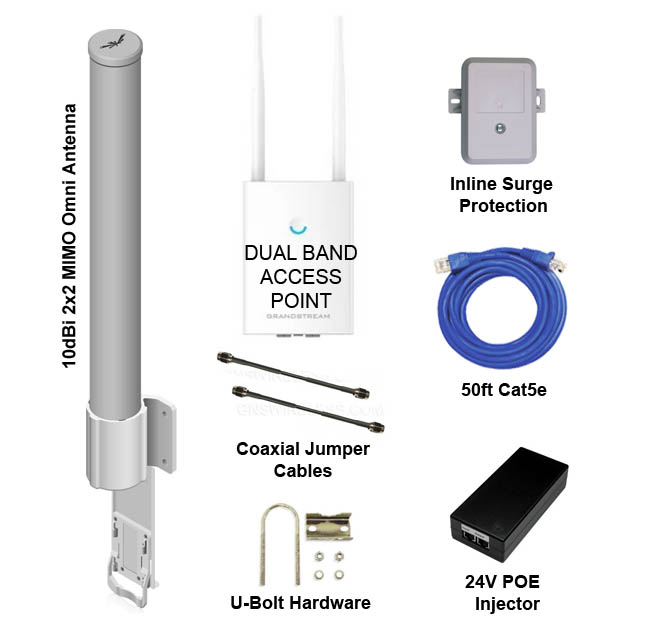
WiFi Hotspot Package
Interference and Long Range WiFi Antennas
Long-range directional antennas divert radio frequency signal energy in one direction to increase the transmission distance. However, this reduces the beamwidth of the signal. Placement is key to achieving the maximum coverage and range. A major consideration and drawback when installing long-range WiFi antennas is signal interference. This packet loss issue can be caused by cordless phones, radar signals from traffic lights, to airports, even microwave ovens. However, the most significant concern, when extending range, is the increased possibility of data security breaches on shared channels.
To make the best choice when extending your WLAN network’s reach, consult with the professionals at GNS Wireless. Our staff will consider individual needs and capably provide the best long-distance WiFi antenna solution. Speak with us at (877) 209-5152, or submit your request via our contact form.
Wireless network routers (and access points) contain a built-in WiFi antenna that radiates signals equally in every direction. These antennas are sometimes called omnidirectional. A system featuring an Omni-directional hotspot antenna will make any router setup easier. When the router is installed in a central location, and wireless clients are distributed throughout the rooms, an Omni-directional antenna will ensure that all corners of the office or particular floor have coverage.
Ease of installation aside, there are certain scenarios where it is better to replace the router’s built-in antenna with an alternate choice. An Omnidirectional antenna can have difficulty reaching greater distances because its signaling power expands in all directions. As an option, some router manufacturers sell external Omni-directional antennas that are significantly stronger than the router’s built-in antenna. Installing a stronger Omni-directional antenna not only reaches locations that are farther away from the router but also ensures that the signal will be uniformly strong. Additionally, because Wi-Fi connections are distance-sensitive, a stronger connection also often leads to increased network performance.
Select a Hotspot Antenna That’s Just Right for Your Needs
There is, however, another side to this coin. Wireless antennas that are too strong will likely create network security issues. Omni-directional antennas can send Wi-Fi signals that bleed outside a building where the radio signals can be snooped. An alternative that also produces a greater WiFi range is a high gain directional antenna which increases signal receptivity, but it may be channeled in a particular direction. By focusing the signal, a high gain antenna allows the signal to be better controlled. For example, the hotspot antenna can be aimed toward the area of the business where wireless devices are located, and away from common areas such as warehouses and reception spaces where the public congregates.
To summarize, any business can improve its wireless network reach and performance by replacing the wireless antenna on a router. Many routers support an external antenna jack that allows connecting the new antenna, making this process simple. If you have any questions about troubleshooting your WiFi hotspot antenna, what antenna is best for your business requirements, or want to know more about any GNS Wireless products, please contact us by calling (877) 209-5152. You can also send us an email, if you’d prefer, to support@gnswireless.com.