
 |
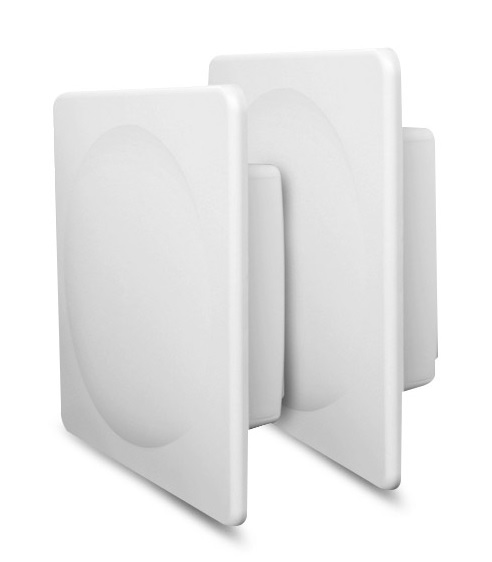
The Proxim Wireless QB-10150L-LNK is a high-performance point-to-point wireless bridge solution that offers reliable, long-range connectivity for a wide range of applications.It is designed to provide fast, secure, and cost-effective connectivity between two points, making it ideal for building-to-building connectivity, video surveillance, and backhaul for Wi-Fi networks. With a range of up to 5 miles (8 km) in clear line-of-sight conditions, the QB-10150L-LNK delivers exceptional long-range connectivity, even in the harshest of outdoor environments. Its ruggedized and weatherproof design ensures reliable operation, making it a cost-effective solution that provides exceptional value for money. Additionally, the QB-10150L-LNK is easy to deploy and manage, with a simple plug-and-play setup and a user-friendly web interface for configuration and management. Whether you’re connecting remote locations, providing backhaul for Wi-Fi networks, or deploying video surveillance systems, the QB-10150-LNK delivers the performance and reliability you need to ensure mission-critical connectivity. |
Proxim Wireless is a leading provider of wireless connectivity solutions, and one of their flagship products is the QB-10150L-LNK. In this blog post, we’ll explore the many benefits of using this high-performance point-to-point wireless bridge solution.
-
Reliable and Secure Connectivity The QB-10150L-LNK offers reliable and secure connectivity for a wide range of applications. With a maximum throughput of 150 Mbps, this solution delivers high-speed, low-latency connectivity over long distances, making it ideal for building-to-building connectivity, video surveillance, and other mission-critical applications.
-
Long-Range Connectivity The QB-10150L-LNK offers exceptional long-range connectivity, with a range of up to 5 miles (8 km) in clear line-of-sight conditions. This makes it an ideal solution for connecting remote locations, such as rural or remote industrial sites, or for providing backhaul connectivity for Wi-Fi networks.
-
Easy Deployment and Management The QB-10150L-LNK is easy to deploy and manage, with a simple plug-and-play setup and a user-friendly web interface for configuration and management. This makes it an ideal solution for organizations with limited IT resources, or for applications where time and resources are limited.
-
Robust and Weatherproof Design The QB-10150L-LNK is designed to withstand harsh outdoor environments, with a ruggedized and weatherproof enclosure that protects against extreme temperatures, high winds, and heavy rainfall. This ensures reliable operation even in the harshest of conditions.
-
Cost-Effective Solution The QB-10150L-LNK is a cost-effective solution that offers exceptional value for money. With a low total cost of ownership and minimal ongoing maintenance requirements, this solution provides an affordable and reliable connectivity solution for organizations of all sizes.
In conclusion, the Proxim Wireless QB-10150L-LNK is a high-performance, reliable, and cost-effective point-to-point wireless bridge solution that offers exceptional long-range connectivity for a wide range of applications. Whether you’re connecting remote locations, providing backhaul for Wi-Fi networks, or deploying video surveillance systems, the QB-10150L-LNK delivers the performance and reliability you need to ensure mission-critical connectivity.
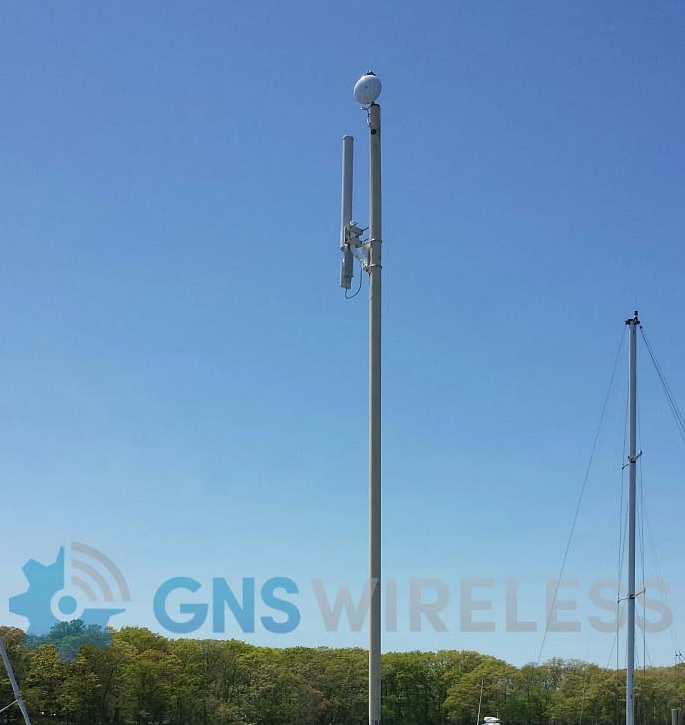 |
Some of the latest trends in outdoor Wi-Fi include the following:
|
If you want to set up an outdoor Wi-Fi network that is fast, reliable, and secure, there are a few key factors to consider.
From selecting the right equipment to optimizing your network settings, there are several steps you can take to ensure that your outdoor Wi-Fi network delivers the best possible performance. In this blog post, we will provide a comprehensive guide to optimizing your outdoor Wi-Fi network.
-
Choose the Right Equipment The first step in optimizing your outdoor Wi-Fi network is to choose the right equipment. Look for devices that are specifically designed for outdoor use, such as weatherproof access points and antennas. Make sure that the equipment you choose is capable of providing the coverage and capacity you need for your specific use case.
-
Plan Your Network Before installing your outdoor Wi-Fi network, it’s important to plan out the placement of your access points and antennas. You should take into account factors such as the distance between access points, the terrain, and any obstacles that may interfere with your signal. This will help you ensure that your network provides comprehensive coverage while avoiding interference or dead zones.
-
Optimize Your Network Settings Once your outdoor Wi-Fi network is up and running, you’ll want to optimize your network settings to ensure the best possible performance. Start by selecting the appropriate channel and channel width for your network. This will help you avoid interference from other Wi-Fi networks or devices. You should also consider implementing Quality of Service (QoS) settings to prioritize traffic and ensure that critical applications receive sufficient bandwidth.
-
Secure Your Network Finally, it’s important to ensure that your outdoor Wi-Fi network is secure. You should use strong encryption and authentication protocols to protect against unauthorized access and data breaches. You should also consider implementing other security measures, such as firewalls and intrusion detection systems, to protect your network from cyber threats.
By following these steps, you can optimize your outdoor Wi-Fi network and ensure that it provides reliable, high-speed connectivity to your users. Whether you’re setting up an outdoor Wi-Fi network for a business, a public space, or a residential community, these best practices can help you deliver the best possible performance and user experience.
Got Wi-Fi?
|
|
The latest trend in Wi-Fi is the adoption of Wi-Fi 6E, which is an extension of Wi-Fi 6. Wi-Fi 6E operates on the 6 GHz frequency band, which is newly available for Wi-Fi use.This additional frequency band provides more spectrum, less interference, and faster speeds, which can lead to better performance, higher capacity, and improved user experience. Other trends in Wi-Fi include the use of mesh networks, which allow for better coverage and connectivity in large areas or buildings, and the integration of artificial intelligence and machine learning algorithms to optimize network performance and troubleshoot issues. Additionally, there is increasing focus on Wi-Fi security and privacy, with the adoption of stronger encryption standards and the development of new security protocols to protect against threats such as hacking and data breaches. |
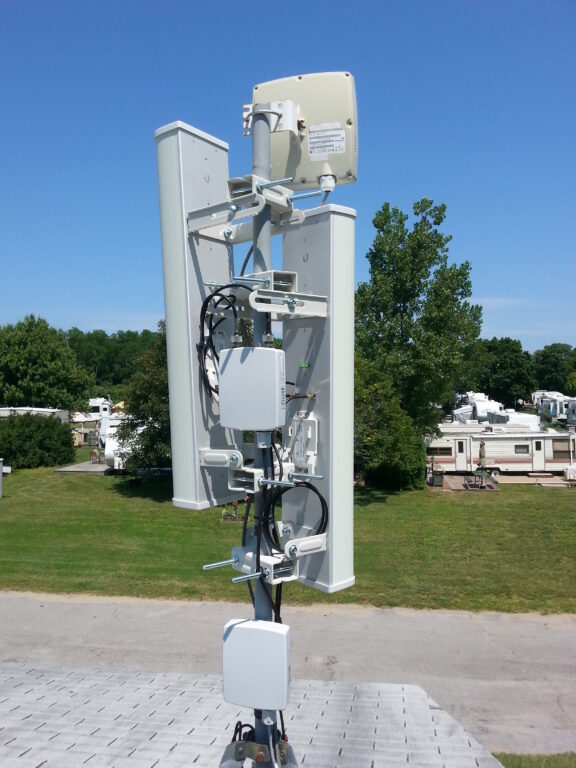
WiFi has become an integral part of our daily lives, enabling us to stay connected with the world and stream our favorite content from anywhere in our homes. However, a poorly set-up WiFi network can lead to slow speeds, connectivity issues, and security vulnerabilities. In this blog post, we’ll share the ultimate guide to setting up a fast and secure WiFi network for your home or office.
Section 1:
Choose the right equipment The first step to setting up a fast and secure WiFi network is to choose the right equipment. This includes a high-speed router, compatible with the latest WiFi standards, such as WiFi 6, and a modem that supports your internet service provider’s (ISP) speeds. Make sure to choose a router with enough coverage for your home or office and sufficient ports for wired devices.
Section 2:
Optimize router placement Router placement is critical for ensuring optimal WiFi coverage and speeds. Place your router in a central location, away from walls and obstructions, and elevate it to increase coverage. Avoid placing it near other electronic devices that may interfere with the signal, such as microwaves and cordless phones.
Section 3:
Secure your WiFi network Securing your WiFi network is crucial to prevent unauthorized access and protect your sensitive data. Change the default network name (SSID) and password to a unique and strong combination of characters. Enable WPA2 or WPA3 encryption, and disable WPS (WiFi Protected Setup) to prevent brute-force attacks.
Section 4:
Update firmware and settings Regularly updating your router’s firmware and settings can improve performance and fix security vulnerabilities. Check your router manufacturer’s website for updates and install them promptly. Also, adjust your router’s settings, such as channel selection, to reduce interference and optimize speeds.
Section 5:
Manage network traffic Managing your network traffic can help prioritize bandwidth-intensive applications, such as video streaming and online gaming. Use Quality of Service (QoS) settings to allocate bandwidth to specific devices or applications. Also, limit the number of devices connected to your network to prevent congestion and slow speeds.
-
Prioritize traffic: Identify which applications or services are most important to your network and give them the highest priority. This can be done using Quality of Service (QoS) mechanisms.
-
Monitor network traffic: Use network monitoring tools to keep track of the traffic on your network. This will help you identify any bottlenecks or congestion points and take corrective action.
-
Implement traffic shaping: Traffic shaping can help you control the flow of traffic on your network by setting limits on how much bandwidth each application or user can use.
-
Use load balancing: Load balancing can distribute network traffic across multiple servers, which can help to reduce congestion and improve performance.
-
Optimize network performance: Make sure that your network is optimized for performance by using the latest hardware and software, and by regularly tuning and updating your network configurations.
-
Secure your network: Implement appropriate security measures to protect your network from threats such as viruses, malware, and unauthorized access. This can help to prevent network congestion caused by malicious traffic.
Overall, managing network traffic requires a combination of careful planning, monitoring, and optimization to ensure that your network is performing at its best while also providing a secure environment for your users.
Setting up a fast and secure WiFi network requires careful consideration of equipment, placement, security, updates, and traffic management. By following the tips and best practices outlined in this guide, you can ensure optimal performance and protect your privacy and data from potential threats.
For more information on setting up your new or existing Wi-Fi network, contact GNS WIRELESS today!
When it comes to providing Wi-Fi coverage for a campground, choosing the right outdoor access point is crucial. GNS Wireless is a leading provider of outdoor access points that are specifically designed to meet the needs of outdoor Wi-Fi networks, making them a great choice for campgrounds.
Here is a comprehensive guide to outdoor access points for campground Wi-Fi using GNS Wireless:
-
Determine Your Coverage Needs: Before choosing an access point, it’s important to determine the coverage needs of your campground. Consider the size of the campground, the number of guests, and the types of devices that will be connected to the network.
-
Choose an Access Point with a Rugged Enclosure: Outdoor access points need to be able to withstand harsh weather conditions, so it’s important to choose an access point with a rugged, weather-resistant enclosure. GNS Wireless offers a range of access points with NEMA-rated enclosures that provide protection against moisture, dust, and extreme temperatures.
-
Consider the Frequency Band: GNS Wireless offers both 2.4 GHz and 5 GHz access points, so it’s important to consider which frequency band will work best for your campground. The 2.4 GHz band provides better coverage over longer distances, while the 5 GHz band offers faster speeds and can handle more devices simultaneously.
-
Look for Advanced Features: GNS Wireless access points offer a range of advanced features, such as multi-user, multiple-input, multiple-output (MU-MIMO) technology, which enables multiple users to connect to the access point simultaneously and receive faster speeds. Other features to consider include beamforming, which helps to improve signal strength and coverage, and band steering, which automatically connects devices to the best available frequency band.
-
Consult with a Wi-Fi Professional: If you’re unsure which access point is best for your campground, it may be a good idea to consult with a Wi-Fi professional. GNS Wireless offers consulting services to help you design, deploy, and manage your Wi-Fi network, ensuring that you get the coverage and performance you need.
By following these tips and using GNS Wireless outdoor access points, you can provide reliable and secure Wi-Fi coverage for your campground guests.
For larger campgrounds and RV Parks, the Cambium Networks XV2 and E500 access points are designed for outdoor use and have robust enclosures that can withstand harsh weather conditions. However, the XV2 may be a better choice for a campground due to its support for the latest Wi-Fi 6 standard and its ability to provide better coverage and handle more devices simultaneously.
For smaller campgrounds, the GNS-1585 will provide 2.4GHz only, but will easily support up to 30 devices per access point, and up to 20Mbps to each device. Sometimes more than enough for streaming, and typical web applications.
Additionally, the XV2’s advanced features, such as multi-user, multiple-input, multiple-output (MU-MIMO) technology, can help ensure that guests receive fast and reliable Wi-Fi speeds, even in areas with high traffic.
Ultimately, the best access point for a campground will depend on the specific needs and requirements of the campground. It may be a good idea to consult with a Wi-Fi professional or a vendor to determine the best access point for your specific situation.
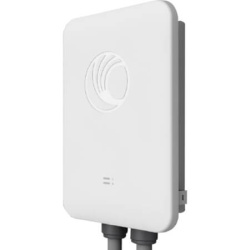 E500 Series Wireless Access Point |
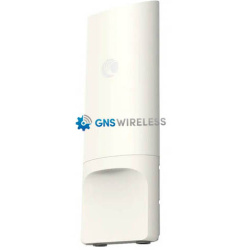 XV2 Series Wireless Access Point |
The Cambium Networks XV2 and E500 are both high-performance access points that offer a range of features and capabilities. While both are designed to provide reliable and secure wireless connectivity, there are some key differences between the two that may influence your decision.
Here are some of the key differences between the XV2 and E500 access points:
-
Wi-Fi 6 vs Wi-Fi 5: The XV2 supports the latest Wi-Fi 6 standard, which offers faster speeds, higher capacity, and improved performance in high-density environments compared to the Wi-Fi 5 standard supported by the E500.
-
Dual-band vs Single-band: The XV2 operates on both 2.4 GHz and 5 GHz bands, while the E500 operates only on the 2.4 GHz band. This means that the XV2 can provide better coverage and more flexibility when it comes to managing wireless traffic.
-
NEMA 4X rating vs IP55 rating: The XV2 has a rugged enclosure with a NEMA 4X rating, which provides superior protection against environmental factors such as moisture, dust, and extreme temperatures. The E500 has an IP55 rating, which offers some protection against the elements but may not be as robust as the NEMA 4X rating.
-
Advanced features: The XV2 includes several advanced features, such as multi-user, multiple-input, multiple-output (MU-MIMO) technology, which enables multiple users to connect to the access point simultaneously and receive faster speeds. The E500 does not include this feature.
-
Cost: The XV2 is generally more expensive than the E500, due in part to its more advanced features and Wi-Fi 6 support.
Overall, the XV2 is a more advanced and feature-rich access point that is better suited for high-density environments or applications that require the latest Wi-Fi 6 technology. However, if you are looking for a more cost-effective option or don’t need the advanced features of the XV2, the E500 may be a suitable alternative, while supplies last. Contact GNS Wireless directly to discuss your application further., 877-209-5152
|
|
Wireless networks, such as WiFi at the campground, or marina, have become increasingly prevalent in our everyday lives.However, in order to ensure the smooth operation of WiFi equipment, it is important to protect it from environmental factors that can cause damage or interfere with signals. This is where NEMA enclosures come in.
|
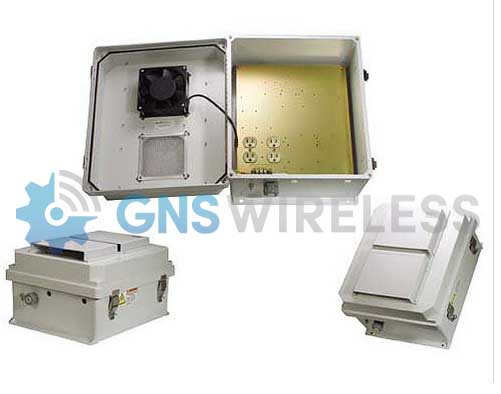
NEMA rated enclosures provide an effective solution for protecting WiFi equipment from harsh environments, including moisture, dust, and temperature extremes. Enclosures can be designed to meet specific NEMA ratings, such as NEMA 4X, which offers protection against rain, sleet, and snow, and is suitable for outdoor applications.
For WiFi applications, NEMA enclosures can house routers, access points, antennas, and other equipment needed to provide wireless connectivity. The enclosures can also be customized with additional features, such as fans, heaters, or air conditioners, to help regulate temperature and humidity levels and maintain optimal performance. Typically, the WiFi enclosures will have 120V power inside the box, with multiple sockets available for your devices.
Using a NEMA rated enclosure for WiFi equipment offers several benefits, including:
-
Protection: NEMA enclosures protect wireless equipment from damage caused by environmental factors, including moisture, dust, and extreme temperatures.
-
Durability: Enclosures are designed to withstand harsh conditions, making them ideal for outdoor or industrial settings.
-
Flexibility: Enclosures can be customized to meet specific needs, with options for various sizes, materials, and additional features.
-
Security: Enclosures provide an added layer of security, protecting equipment from theft or tampering.
NEMA rated enclosures are suitable for a wide range of applications, including:
- Housing electrical control panels and components in industrial settings
- Protecting sensitive electronic equipment in harsh environments, such as manufacturing facilities, chemical plants, and wastewater treatment plants
- Safeguarding electrical power distribution equipment, such as switchgear and transformers, in outdoor settings
- Housing telecommunication equipment and electronics, such as routers, switches, and servers, in data centers or outdoor enclosures
- Providing protection and security for surveillance cameras, access control systems, and other security equipment
- Housing outdoor lighting and electrical wiring in commercial and residential settings, such as parking lots, buildings, and construction sites
- Protecting medical equipment, such as imaging systems and diagnostic equipment, in hospitals and clinics
- Providing protection and security for equipment in hazardous locations, such as refineries, mines, and oil rigs
How to choose the correct NEMA Enclosure:
- Select the appropriate NEMA rating for your intended application (e.g. NEMA 1, NEMA 4X, NEMA 12, etc.)
- Choose the appropriate size and shape of the enclosure based on the equipment or components you need to house
- Decide on the material of the enclosure, such as stainless steel, aluminum, or plastic, based on environmental conditions and durability requirements
- Determine if any additional features are needed, such as ventilation, cooling, heating, or insulation
- Choose the type and size of the access doors or panels needed for easy installation, maintenance, and repair
- Plan for cable entry and exit points, including cable glands or conduit fittings, to maintain the enclosure’s NEMA rating and prevent water or dust ingress
- Consider adding internal mounting panels or rails to secure equipment or components and optimize the use of space inside the enclosure
- Test the finished NEMA enclosure to ensure it meets the appropriate NEMA rating and any other safety or performance requirements.
In conclusion, if you want to ensure the smooth operation of your WiFi equipment, using a NEMA rated enclosure is a smart choice. With the right enclosure, you can protect your equipment from environmental factors, improve its durability, and enhance security. For more information contact GNS Wireless at (516) 214-0321. Furthermore, you can browse our selection of NEMA boxes here.
Floating aquabanas have become increasingly popular as a way to enjoy the water while also having a comfortable and relaxing experience.
These floating structures offer a unique opportunity to stay connected with nature, but they also present challenges when it comes to providing a reliable Wi-Fi connection. However, the importance of Wi-Fi in floating aquabanas cannot be overstated, as it plays a crucial role in keeping guests connected and satisfied.
Here are some reasons why reliable Wi-Fi is so important in floating aquabanas:
-
Access to Information: Guests expect to have access to the internet while on vacation, whether it’s to check their email or stay up to date on social media. Wi-Fi allows guests to stay connected to the world while enjoying the beauty of nature.
-
Entertainment: Wi-Fi also provides guests with a source of entertainment while on their floating aquabanas. They can stream movies or music, play games online, or catch up on their favorite TV shows.
-
Safety: Wi-Fi can also play a critical role in safety. Guests can use their devices to communicate in case of an emergency, or to contact someone on land if they need assistance.
-
Business Needs: Many guests may need to stay connected to work while on vacation, especially those who are self-employed or running their own businesses. Wi-Fi enables guests to stay connected with their work even while enjoying a relaxing vacation.
-
Customer Satisfaction: Providing Wi-Fi to guests on floating aquabanas is becoming an expectation rather than an option. Offering a reliable Wi-Fi connection helps ensure that guests are satisfied with their experience and are more likely to recommend the location to others.
GNS Wireless is a company that specializes in providing outdoor Wi-Fi solutions, including for aquatic environments. Here are some steps you can take to provide reliable Wi-Fi to your aquabana using GNS Wireless:
-
Assess Your Needs: Determine your specific needs for Wi-Fi on your aquabana, such as the number of devices that will be connected, the size of the area that needs coverage, and the types of activities that will be performed. This will help you select the appropriate equipment and determine the best placement for your Wi-Fi equipment.
-
Choose the Right Equipment: GNS Wireless offers a range of Wi-Fi equipment suitable for aquatic environments. Their equipment is designed to be waterproof and withstand harsh outdoor conditions. For example, you may want to consider using an outdoor access point such as the EnGenius ENS202EXT or the Cambium cnPilot e430H, which are specifically designed for outdoor use and have a long-range capability.
-
Plan Your Placement: Determine the optimal location for your Wi-Fi equipment to ensure that it covers the entire aquabana. This may involve mounting your equipment on a pole, a mast, or a rooftop. Be sure to select a location that has a clear line of sight to your access point, as any obstructions such as trees or buildings can weaken the signal.
-
Set Up Your Equipment: Once you have determined the optimal location for your Wi-Fi equipment, it’s time to set it up. Follow the instructions provided by GNS Wireless to properly install and configure your equipment. This may include setting up a password-protected network, creating a guest network, and adjusting the power settings to optimize coverage.
-
Test and Monitor: After setting up your Wi-Fi equipment, it’s important to test it and monitor its performance regularly. Use a Wi-Fi speed test to determine the strength and speed of your signal, and make adjustments as needed to optimize performance.
By following these steps, you can provide reliable Wi-Fi to your aquabana using GNS Wireless equipment. It’s important to keep in mind that outdoor Wi-Fi coverage can be affected by weather conditions and other factors, so it’s a good idea to have a backup plan in case of connectivity issues.
Are you tired of manually tracking your energy consumption in your RV or motorhome? Wireless metering could be the solution you’ve been looking for.
Wireless metering is a technology that allows you to monitor your energy consumption in real-time without the need for manual tracking. By installing wireless meters in your RV or motorhome, you can easily keep track of your energy usage and make adjustments as needed to save money and reduce your environmental impact.
Here are some of the benefits of using wireless metering in your RV or motorhome:
-
Real-time monitoring: With wireless metering, you can monitor your energy consumption in real-time, giving you the information you need to make informed decisions about your energy usage.
-
Easy installation: Wireless meters are easy to install and can be connected to your existing energy management system. You can also install them yourself, saving you the cost of hiring a professional.
-
Accurate readings: Wireless meters provide accurate readings of your energy consumption, allowing you to pinpoint areas where you can make changes to reduce your energy usage.
-
Cost savings: By monitoring your energy consumption in real-time, you can identify areas where you are using more energy than necessary and make adjustments to save money on your energy bill.
-
Environmentally friendly: By reducing your energy consumption, you can reduce your environmental impact and contribute to a more sustainable future.
Wireless metering is a game-changer for RV and motorhome owners, providing an easy and efficient way to monitor energy usage. With real-time monitoring, accurate readings, and cost savings, it’s a technology that can pay for itself in no time.
If you’re ready to take control of your energy consumption and reduce your environmental impact, consider installing wireless meters in your RV or motorhome today. You’ll be amazed at the difference it can make.
As businesses continue to expand and remote work becomes more prevalent, the need for seamless connectivity across different locations has become more critical than ever. One solution that has gained traction in recent years is the use of wireless bridges to connect two separate locations without the need for physical cabling.
Wireless bridges offer several advantages over traditional wired connections. They are flexible, cost-effective, and easy to deploy, making them an ideal solution for businesses with multiple locations or remote sites. One such wireless bridge that stands out is the 3-Gigabit Point-to-Point Wireless Backhaul from GNS Wireless.
This particular wireless bridge boasts a 60GHz interference-free frequency band and can connect two locations up to 1.2 miles apart. With a data transfer rate of up to 3Gbps, it offers lightning-fast connectivity that is ideal for data-intensive applications.
One of the most significant advantages of the 3-Gigabit Point-to-Point Wireless Backhaul from GNS Wireless is its ease of deployment. Unlike traditional wired connections, it requires minimal infrastructure changes, making it a cost-effective solution for businesses that want to expand their network quickly. Moreover, the interference-free frequency band ensures reliable and secure connectivity, making it an ideal solution for businesses that deal with sensitive information.
Another advantage of this wireless bridge is its scalability. As businesses grow and expand, they may need to connect more locations to their network. With the 3-Gigabit Point-to-Point Wireless Backhaul, businesses can easily expand their network without the need for additional infrastructure changes or cabling.
In conclusion, the 3-Gigabit Point-to-Point Wireless Backhaul from GNS Wireless is an ideal solution for businesses that want reliable, secure, and cost-effective connectivity between two locations. With its lightning-fast data transfer rates and interference-free frequency band, it offers businesses the ability to expand their network quickly and efficiently. To learn more about this wireless bridge and how it can benefit your business, view the all new GNS-5460-SFP.
If you’re running an RV park or campground, you want to ensure that your guests have access to a reliable Wi-Fi network that can handle multiple concurrent users. GNS Wireless can help you achieve this by providing high-performance wireless networking solutions designed specifically for outdoor environments.
Here are some of the ways GNS Wireless can ensure that your Wi-Fi network can handle multiple concurrent users in your RV park or campground:
-
Scalable Wi-Fi Solutions: GNS Wireless offers scalable Wi-Fi solutions that can grow with your business needs. Whether you need to add more access points or increase the capacity of your network, GNS Wireless has the hardware and expertise to help you scale your network as your business grows.
-
Outdoor Access Points: GNS Wireless provides outdoor access points that are designed to withstand harsh outdoor conditions, including rain, wind, and extreme temperatures. These access points are built to last and can provide reliable Wi-Fi coverage across your entire property.
-
High-Performance Hardware: GNS Wireless offers high-performance Wi-Fi hardware that supports the latest Wi-Fi standards, including 802.11ac Wave 2. This hardware provides faster data transfer rates, more bandwidth, and better coverage, ensuring that your guests have a fast and reliable Wi-Fi experience.
-
Custom Network Design: GNS Wireless can design a custom network for your RV park or campground that takes into account the layout of your property, the number of guests you expect, and the types of devices they’ll be using. This custom network design ensures that your network is optimized for your specific needs.
-
Wi-Fi Management Software: GNS Wireless provides cloud based Wi-Fi management software that allows you to monitor and manage your network from a single dashboard. You can view real-time network statistics, configure access points, and troubleshoot network issues, ensuring that your network is always running smoothly.
By working with GNS Wireless, you can ensure that your RV park or campground has a reliable Wi-Fi network that can handle multiple concurrent users. With scalable Wi-Fi solutions, high-performance hardware, custom network design, and Wi-Fi management software, GNS Wireless has everything you need to create a fast and reliable Wi-Fi experience for your guests. Contact us today to get started!
WiFi Amplifiers are an essential part of our daily lives.
Whether we’re using it for work, entertainment, or just staying connected with friends and family. However, weak Wi-Fi signals and dead zones can be a frustrating and all-too-common problem.
Fortunately, WiFi amplifiers from GNS Wireless can help.
A amplifier will boost WiFi signal strengths in both 2.4 and 5.8 GHz frequencies. A quality amplifier will eliminate dead zones, and ensure that you have a strong and reliable connection no matter where you are.
At GNS Wireless, we offer a variety of WiFi amplifiers to meet your specific needs. Our amplifiers work with all types of routers and access points, making them a great choice for home and office users alike. Whether you need to extend your WiFi coverage to a larger area or eliminate dead zones in specific locations, our WiFi amplifiers can help.
One of the best things about our WiFi amplifiers is how easy they are to install and use. Simply plug the amplifier into a power outlet, connect it to your router or access point, and you’re ready to go. Plus, our amplifiers come with advanced security features, such as WPA/WPA2 encryption, to help keep your network secure.
With a WiFi amplifier from GNS Wireless, you can enjoy a strong and reliable WiFi connection without the frustration of weak signals and dead zones. Browse our selection of WiFi amplifiers now at gnswireless.com and start enjoying a better WiFi experience today.
In conclusion, if you’re tired of struggling with weak WiFi signals and dead zones, a WiFi amplifier from GNS Wireless is the solution to consider. Our amplifiers are easy to install, work with all types of routers and access points, and come with advanced security features to keep your network secure. Learn more and browse our selection at gnswireless.com.
2.4 Ghz WiFi amplifiers:
These amplifiers are designed to boost the signal strength of your 2.4 GHz WiFi network inside your home or office.
Outdoor WiFi amplifiers:
These amplifiers are designed to extend the coverage of your 2.4 GHz WiFi network to outdoor areas, such as a backyard or patio.
High-power amplifiers:
These amplifiers provide even greater signal strength than standard amplifiers, making them ideal for large homes or businesses.
Dual-band Network Amplifiers:
These amplifiers work with both 2.4GHz and 5GHz frequencies, allowing you to boost the signal strength of both bands.
Long-range Wi-Fi amplifiers:
These amplifiers are designed to extend the range of your WiFi network to distances of several miles, making them ideal for outdoor use or in rural areas.
If you’re a farmer or agricultural property owner, you understand the importance of staying connected.
With advancements in technology and the increasing use of IoT devices in farming, a reliable and extended WiFi network is essential. GNS Wireless can help extend your WiFi network and improve connectivity across your entire farm.
Here are some of the ways GNS Wireless can help you extend your WiFi at your farm:
-
Free Site Survey: GNS Wireless can conduct a site survey to determine the best placement for WiFi access points on your farm. By analyzing the signal strength and coverage of existing access points, GNS Wireless can determine the optimal placement of new access points to ensure maximum coverage and signal strength.
-
Outdoor WiFi Access Points: GNS Wireless can install outdoor WiFi access points that are designed to withstand harsh outdoor conditions such as extreme temperatures, wind, and rain. These access points provide extended coverage and improved signal strength in outdoor areas such as fields, barns, and sheds.
-
Point-to-Point Wireless Links: GNS Wireless can set up point-to-point wireless links to connect remote buildings or locations across your property. This solution is ideal for farms and agricultural properties with multiple buildings or locations that need to be connected to a central WiFi network.
-
Mesh Network: GNS Wireless can set up a mesh network that uses multiple access points to create a seamless WiFi network across your entire property. This solution is ideal for larger farms and agricultural properties that require broad coverage.
-
Customized Solutions: GNS Wireless can provide customized solutions to meet the specific needs of your farm. Whether you require high-speed data transfer for precision farming or real-time monitoring of IoT devices, GNS Wireless can tailor a solution to meet your requirements.
In summary, GNS Wireless can help extend your WiFi network and improve connectivity across your entire farm. By conducting a site survey, installing outdoor access points, setting up point-to-point wireless links, or creating a mesh network, GNS Wireless can provide customized solutions to meet your specific needs. Contact GNS Wireless today to discuss your requirements and to learn more about how they can help improve your farm’s connectivity.
Should you use 2.4 GHz, or will 5 GHz provide better coverage?
There are several benefits of using the 2.4 GHz frequency for covering a farm with WiFi:
-
Greater Coverage: The 2.4 GHz frequency has a longer wavelength than the 5 GHz frequency, which allows it to penetrate obstacles such as walls and trees more effectively. This makes it ideal for covering large areas such as farms, where there may be obstacles that could interfere with the signal.
-
Lower Cost: 2.4 GHz WiFi equipment is generally less expensive than 5 GHz equipment, making it a cost-effective option for farms with limited budgets.
-
Better Compatibility: The 2.4 GHz frequency is widely used and supported by most WiFi devices, including older devices that may not support the newer 5 GHz frequency. This means that using 2.4 GHz WiFi will ensure that all of your devices can connect to the network.
-
Longer Range: Because of the lower frequency and longer wavelength, 2.4 GHz WiFi signals can travel further distances than 5 GHz signals. This means that fewer access points are required to cover a large area, which can save time and money during installation.
-
Better Performance in Crowded Environments: The 2.4 GHz frequency is less prone to interference from other devices, such as Bluetooth devices, microwaves, and cordless phones, which all operate on the 2.4 GHz frequency. This makes 2.4 GHz WiFi a better choice for crowded environments such as farms, where there may be a lot of other devices in use.
Using the 2.4 GHz frequency for covering a farm with WiFi provides greater coverage, lower cost, better compatibility, longer range, and better performance in crowded environments. While there are some limitations to using 2.4 GHz WiFi, such as slower speeds and susceptibility to interference from other devices, these are generally outweighed by the benefits in farm environments.
Can the new Wi-Fi at the Farm be connected to Starlink?
Yes, it is possible to connect a farm’s Wi-Fi network to Starlink and have a reliable internet connection. Starlink provides high-speed, low-latency internet access, which can support a wide range of applications, including Wi-Fi networking.
To connect a Wi-Fi network to Starlink, you will need to set up a router or access point that can connect to the Starlink modem. This can be done by following the instructions provided by the router manufacturer, or by consulting with a professional networking service.
Once the router or access point is connected to the Starlink modem, you can configure the Wi-Fi network to provide internet access to your farm’s devices. This can include computers, smartphones, tablets, and other devices that require internet connectivity.
It is important to note that the reliability of the Wi-Fi network will depend on several factors, including the quality of the equipment used, the strength of the Wi-Fi signal, and the number of devices connected to the network. To ensure the best possible performance, it is recommended to use high-quality equipment and to limit the number of devices connected to the network at any given time.
Overall, connecting a farm’s Wi-Fi network to Starlink can provide reliable internet access that can support a wide range of applications. By using high-quality equipment and following best practices for Wi-Fi networking, farmers can ensure that their internet connection is fast, reliable, and able to meet the needs of their business.