
Why Your Campground Wi-Fi Fails at the Far End — and What You Can Do About It
If you’ve ever walked to the far side of your RV park or marina and wondered why the Wi-Fi suddenly drops to a crawl—or disappears completely—you’re not alone. Many owners ask us the same thing: “Why can’t we just repeat the signal from one access point to the next?”
The short answer? You can. But you shouldn’t—at least not if you want fast, reliable internet across your entire property.
Let’s break it down.
Repeater Mode: Cheaper Upfront, Costly Over Time
Repeater mode works by wirelessly extending your signal from one access point to another. It’s a budget-friendly option and easy to deploy. But here’s the catch: every time the signal is repeated, it cuts the available bandwidth in half.
Here’s why: in most mesh-style repeater setups, the access point uses the 5 GHz band for backhaul (communicating with the previous AP) and 2.4 GHz for local user traffic (connecting to phones, laptops, etc.). This dual-role setup limits overall performance and adds latency.
As a general rule, you shouldn’t repeat a signal more than three hops—beyond that, the speed becomes unreliable and practically unusable for streaming or high-demand usage.
In low-traffic environments, this might be acceptable. But in a campground with 50 RVs or a marina full of boaters trying to stream and scroll? You’ll be buried in complaints.
Point-to-Point Backhaul: Faster, Smarter, Scalable
Instead of repeating the signal, a point-to-point (PTP) link creates a dedicated wireless bridge between your main network and each remote access point. It’s like running a direct cable—only wirelessly.
The benefit? Your remote access points get full bandwidth, independent of each other. That means:
-
Faster speeds
-
Lower latency
-
Reliable coverage, even hundreds of feet from the main office
-
Room to scale without sacrificing performance
Yes, this approach costs more upfront. You’ll need additional antennas and power enclosures, and sometimes even pole mounts. But if you want your guests happy—and your reviews to reflect that—it’s worth it.
Real-World Example: Why PTP Beats Repeater Every Time
A recent RV park in Illinois came to us frustrated. They had decent Wi-Fi near the office, but it fell apart by the lakeside cabins. Their setup was all repeaters—four hops from the source. By the time the signal reached the far end, it wasn’t usable.
We redesigned the system using point-to-point backhaul links. Now, each access point gets full speed, and guests on the edge of the park can stream just like the ones near the front desk. No buffering. No complaints.
Bottom Line: Repeater Mode Is a Shortcut, Not a Solution
If you’re serious about offering reliable Wi-Fi across your property, repeating your signal from one access point to the next just won’t cut it. A well-designed system with point-to-point links may cost more—but it delivers the results your guests expect.
At GNS Wireless, we’ve been designing Wi-Fi for campgrounds, RV parks, and marinas for over 20 years. We know what works, and more importantly, what doesn’t.
Ready for Better Wi-Fi?
📍 Send us your park layout or address
📐 We’ll provide a free custom site survey
📞 Call us at 877-209-5152 or visit www.gnswireless.com
Don’t keep repeating the same mistake. Go point-to-point, and give your guests the Wi-Fi they deserve.
How (and Why) to Disable STP and BPDU on MikroTik nRAY60 Wireless Links
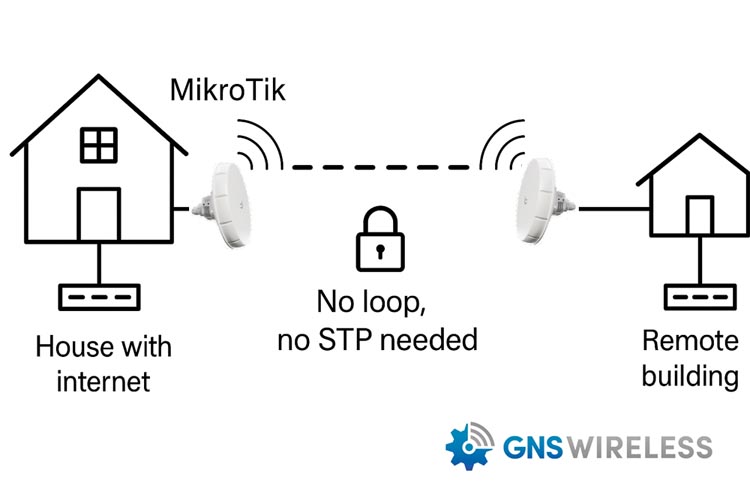
The MikroTik nRAY60 is a high-speed 60GHz wireless bridge, perfect for point-to-point (PTP) links across short distances. Whether you’re connecting a barn to a house, a shop to a main building, or extending service from a home to an office, the nRAY60 provides gigabit-level performance with clean line of sight.
But there’s a small detail that can make or break your install: STP and BPDU traffic.
In this post, we’ll explain why you should disable STP (Spanning Tree Protocol) and BPDU (Bridge Protocol Data Units) in PTP setups — and how to do it the right way.
🚫 What Is STP, and Why It’s Not Needed in PTP?
Spanning Tree Protocol (STP) is designed to detect and eliminate Ethernet loops in redundant networks. It prevents broadcast storms by calculating the most efficient path between switches.
However, in a simple point-to-point wireless bridge, like a pair of nRAY60s:
-
There’s no loop.
-
There’s no redundant path.
-
Therefore, there’s no reason for STP to be enabled.
🔄 Side Effects of Leaving STP Enabled:
-
Long boot delays (15–30 seconds) before interfaces forward traffic
-
Unexpected port blocking from managed switches detecting unknown BPDUs
-
Unnecessary STP negotiation, adding latency and complexity
✅ Benefits of Disabling STP/BPDU in PTP Links
| Advantage | Why It Matters |
|---|---|
| ⚡ Faster link initialization | No STP delay — traffic flows immediately |
| 🔒 Prevent switch port blocking | Avoid false loop detection on managed switches |
| 🚀 Improved reliability | Less protocol overhead = more stable bridge |
| 🛠️ Easier troubleshooting | Simplifies link behavior and startup consistency |
🛠️ How to Disable STP and BPDU on MikroTik nRAY60
Step 1: Disable STP on the Bridge
STP is controlled by the bridge interface.
In Winbox or WebFig:
-
Go to Bridge > Bridge
-
Double-click
bridge1(or your bridge name) -
Set Protocol Mode to
none -
Click Apply
Or via CLI:
/interface bridge set bridge1 protocol-mode=none
Step 2: Mark Ether1 as an Edge Port
Marking the Ethernet port as an Edge Port tells STP (if enabled) that it’s connected to an endpoint — skipping the usual blocking/listening stages.
In Winbox/WebFig:
-
Go to Bridge > Ports
-
Double-click
ether1 -
Check the Edge box
-
Apply changes
CLI:
/interface bridge port set [find interface=ether1] edge=yes
✅ This setting is optional if STP is disabled, but it’s good practice on endpoint ports.
Step 3: Understand Wireless Interface Behavior
The 60GHz interface (e.g., wlan60-1) does not forward BPDUs and does not participate in STP.
No changes are needed for the wireless interface — the optimization applies to Ether1 and bridge configuration only.
⚠️ Is There Any Risk in Disabling STP?
Only if your setup includes:
-
Multiple switches
-
Redundant Ethernet links
-
Or bridging on both ends of the PTP link
In these cases, STP should remain enabled to protect against switching loops.
But if your PTP setup is:
-
One link
-
No loops
-
One uplink per end
Then disabling STP is not only safe — it’s recommended.
MikroTik BPDU filter, disable spanning tree protocol MikroTik, STP edge port MikroTik, optimize wireless bridge performance, point-to-point wireless configuration MikroTik
🧰 Need Help Configuring Your MikroTik nRAY60?
At GNS Wireless, we pre-configure your wireless bridge systems to ensure optimal performance right out of the box — including STP, VLAN tagging, IP addressing, and more.
Let us help with your next install.
📞 Call now: 877-209-5152
🌐 Visit: www.gnswireless.com
📝 Free Site Survey & Custom Quote
Success Story: How Whispering Pines Campground Boosted Guest Satisfaction by 35% with GNS Wireless Wi-Fi Solutions
Campground Wi-Fi Success Story
🏕️ About Whispering Pines Campground
Whispering Pines Campground is a 200-site family campground tucked in the hills of upstate New York. They offer cabins, RV sites, tent camping—and lots of trees, lakes, and open trails. Until recently, they had a problem:
👉 Spotty Wi-Fi coverage that guests complained about in reviews almost weekly.
Campground owner Lisa M. knew something had to change after reading one too many comments like:
“Loved the nature—hated the Wi-Fi.”
“Couldn’t even get a signal at our campsite.”
🔍 The Challenge: Dead Zones, Guest Complaints, and Lost Revenue
Lisa’s original Wi-Fi setup relied on a basic home router tucked away in the front office. Coverage barely extended beyond the lodge, and guests further out had no signal.
Problems included:
-
Dead zones at cabins and popular tent sites
-
Weak signal during peak summer weekends
-
Frustrated remote workers and families trying to stream
The campground was losing guests to competitors who advertised better connectivity.
⚡ The GNS Wireless Solution
After a free consultation and heat map analysis, GNS Wireless designed a custom solution:
-
Installed 4 outdoor Wi-Fi 6 access points with weatherproof enclosures to house the POE and PS.
-
Used directional antennas to target remote cabin clusters
-
Added a 60 GHz point-to-point wireless bridge to connect distant areas without trenching cable
-
Configured a mesh network to ensure seamless roaming from site to site
-
Provided remote monitoring and management options so Lisa’s team could track network health easily
✔️ All equipment was pre-configured for easy install
✔️ Designed to withstand New York’s snowy winters and hot summers
📈 The Results: Happy Guests, Higher Reviews, More Bookings
Within just 30 days of going live:
-
⭐ Guest satisfaction scores related to Wi-Fi jumped by 35%
-
⭐ Overall Google review rating increased from 3.9 to 4.5 stars
-
⭐ Campsite bookings rose 12% year-over-year
-
⭐ Staff reported 90% fewer Wi-Fi-related complaints
Guests began leaving comments like:
“Perfect place to unplug—or plug in if you want! Wi-Fi was great everywhere.”
“Worked remotely from our cabin with no issues. Can’t wait to come back!”
📞 Ready to Create Your Own Wi-Fi Success Story?
Whether you manage 20 campsites or 200, GNS Wireless has a solution that fits your campground or RV park.
✅ Get a free site survey
✅ Custom coverage maps
✅ Pre-configured outdoor Wi-Fi packages
✅ Support before, during, and after installation
Contact us today at 877-209-5152 or Request a Quote »
Let’s turn your guest complaints into glowing 5-star reviews!
Choosing the Right 24V Solar Power System: RPS2424-100-170 vs RPS12/24-100-170
When you’re powering critical wireless infrastructure in remote areas, selecting the right solar power solution is key to keeping your network online. At GNS Wireless, we offer dependable off-grid systems that are ready to go — but with multiple models to choose from, how do you know which one’s right for you?
In this post, we break down the key differences between the Tycon Systems RPS2424-100-170 and RPS12/24-100-170, two of our most popular solar power systems. Each has unique benefits tailored for different types of installations.
🔍 Quick Comparison Table
| Feature | RPS2424-100-170 | RPS12/24-100-170 |
|---|---|---|
| Battery Voltage | 24V (fixed) | Selectable 12V or 24V |
| PoE Output | Yes – 24V Passive PoE (1 Port) | No |
| DC Output | Yes – 24V DC terminal output | Yes – 12V or 24V terminal output |
| Controller Type | PWM with PoE terminal | PWM with LCD, no PoE |
| Load Capacity | 1.5A DC terminal + 30W Passive PoE | Up to 20A DC output |
| Best Use Case | PoE APs, cameras, radios needing DC + PoE power | General DC-powered devices, flexible voltage setups |
📈 Real-World Applications
✅ Choose the RPS2424-100-170 if you:
-
Need to power a 24V Passive PoE access point, IP camera, or bridge antenna.
-
Want a single-box solution that provides both PoE and 24V DC output.
-
Prefer an easier install with no need for a separate PoE injector or switch.
Example: Mount a point-to-point backhaul antenna using the 24V DC terminal, and run a PoE access point from the built-in PoE port.
✅ Choose the RPS12/24-100-170 if you:
-
Need flexible 12V or 24V DC output for a variety of devices.
-
Don’t need built-in PoE but plan to use your own PoE switch.
-
Are supporting multiple devices like a camera, access point, and router in a small cabinet.
Example: Use the selectable voltage output to run a DC-powered gateway and connect a PoE switch to power a camera and Wi-Fi AP.
💡 Wiring Diagrams
RPS2424-100-170:
[ Solar Panel ]
      |
[ RPS2424-100-170 Enclosure ]
      |---> [ 24V Passive PoE Port ] ---> [ PoE AP / Camera ]
      |---> [ 24V DC Terminal ] -------> [ PTP Bridge / Controller ]
RPS12/24-100-170:
[ Solar Panel ]
      |
[ RPS12/24-100-170 Enclosure ]
      |---> [ 12V or 24V DC Terminal ] ---> [ DC Router / PoE Switch ]
                                              |---> [ PoE AP / IP Camera ]
                                              |---> [ PTP Bridge ]
✨ Included with Both Systems
-
170W high-efficiency solar panel
-
100Ah sealed AGM lead-acid battery
-
Powder-coated, weatherproof aluminum enclosure
-
Wall or pole mount hardware
-
Thermostat-controlled cooling fan
-
3-year manufacturer warranty
🔎 Why Choose GNS Wireless?
-
✔️ Free system design & site surveys
-
✔️ Custom PoE switch and antenna bundles
-
✔️ Pre-sales technical support from industry experts
-
✔️ Over 20 years helping customers power remote wireless networks
🎉 Get Your Custom Quote Today
Need help picking the right system? We’re here to make it easy. Whether you’re building a wireless backhaul or securing your property with PoE cameras, we’ll match the best solution to your application.
📞 Call GNS Wireless at 877-209-5152
📈 Get a Free Quote
🛒 Shop Solar Power Systems