
How does Power over Ethernet work?
What is Power Over Ethernet? Power over Ethernet is a technology that lets network cables (cat5) carry electrical power, as well as data.
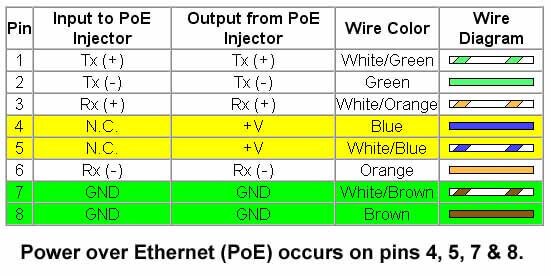
- A typical cat5e cable for example, has 8 wires inside that flexible outter cable that you are pulling. 4 wires are used for data, leaving the other 4 wires for power.
- When you install an access point outdoors, like the Ubiquiti Rocket M2 2.4 GHz MIMO Rocket AP, it requires a power and data connection.
- Because the RocketM2 is POE-enabled, only the network connection needs to be made, as this access point will receive its electrical power from this cable as well.
What is a PoE Injector?
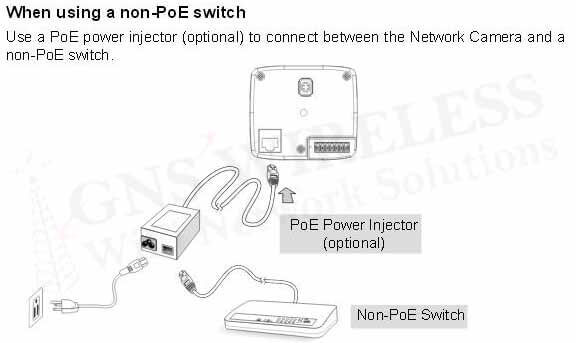
A POE Injector is used to add POE capability to regular non-POE network links. If you have an existing LAN, and want to add a outdoor access point, or IP security camera for example, a POE injector can be used. These are also called single port POE injectors, as they provide power + data to only 1 device. These POE injectors have different power outputs, which depending on the device you are trying to power, will determine which POE to use. For example, most residential grade access points, and routers will use a 12V, or 24V POE. More commercial grade access points, and wireless Ethernet bridges, will use a 48V PoE Power Supply.
What is a PoE Ethernet Switch?
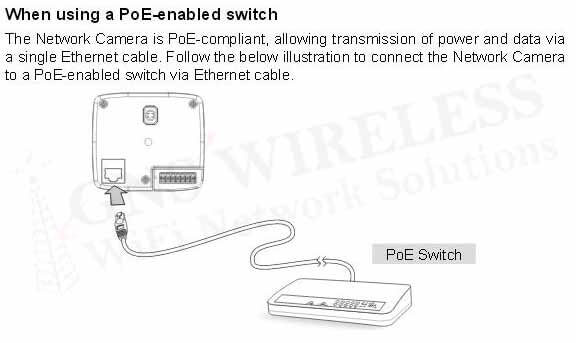
A POE switch is a network switch that has Power over Ethernet injection built-in to some or all of its ports. It is basically a POE injector on each one of the POE enabled ports. This type of switch is useful when you are installing multiple access points that are POE-enabled, and do not want to add cludder to your power strip. To avoid using multiple POE injectors, a single POE switch will suffice.
What is the use of PoE?
Power over Ethernet brings many advantages to wireless network installations. Typically we are installing access points in the attic, on the roof, or up a pole, or tower. To prevent running both power and data lines concurrently, POE makes installations easy and more effecient by requiring only the cat5 cable. Typically maximum distance limitations are 300ft. or less.
Without requiring an electrical outlet next to every AP that is installed, POE makes installations flexible. We can install access points, and wireless bridge antennas virtually anywhere within 300ft. of a power outlet, or network switch.
Is it time to upgrade your Campground Network?
Today’s camper, RV’er and even the lucky ones sitting on their boat at a favorite marina want their Campground Wi-Fi network reliable and easy to use.
They want fast, secure, and reliable Wi-Fi for streaming, working and play. The days of having to walk over to the main office to check email and download a movie are long gone. Wi-Fi at campgrounds has to have the power to penetrate trees, penetrate the RV’s themselves, and not be susceptible to other Wi-Fi devices causing interference and slowdowns. It just needs to work.
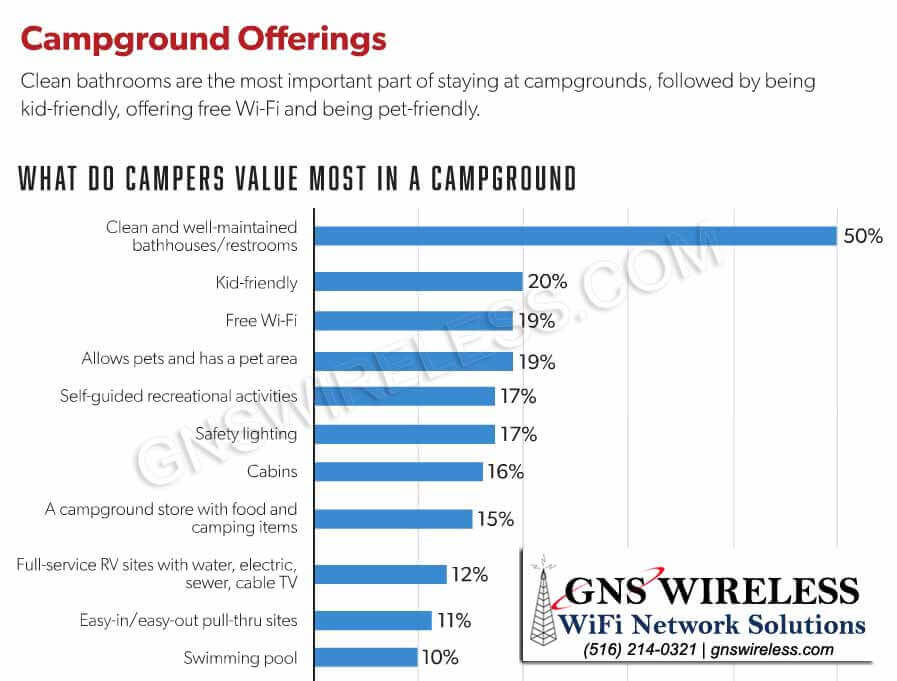
According to a recent KOA article, FREE Wi-Fi is among the top three things desired most when choosing a campground. Only clean bathrooms, and having a kid friendly park are more important.
If you are looking to add Wi-Fi to your park, upgrade your existing Wi-Fi, or just want something that works better that an off the shelf wireless router, see below for how GNS Wireless can help.
Step 1: Create a Map of Your Campground
This is the very first thing we need to get started on designing the right Wi-Fi setup for your Campground or RV Park. If you have a park map, great, email it over. If not, provide us your campground address and we will pull it up on Google Earth. The park map will help us determine the size and scope of your campground, how many trees, how many antennas are needed, and what type of antennas are needed. We use the campground map to provide you a Wi-Fi coverage map to illustrate where you will have the best coverage, and where the AP’s will be located.
- Mark where your main office is located
- Specify where the Internet is located
- How fast is your Internet speed?
- Do you have additional locations with power?
- Mark any areas of importance, and areas where coverage is not needed
Step 2: Where do you have power in the park?
Depending on the size of your Campground or RV Park, we may need to add additional access points for full Wi-Fi coverage. For small parks, a pre-packaged hotspot solution will work when mounted on the roof of the main office. If the main office is in the middle of the park, use the GNS-1685. If your main office is on one side or corner of the park, use the GNS-1485. For larger parks, having power available in locations such as a bath house, pavilion, or maintenance shop will give us ideas on where to place the additional access points. Although there are options such as solar power for parks with no access to 120V lines, we want to try and avoid that or use it as a last resort, as solar power gets expensive. If we can provide you with the lowest cost solution, we will do so.
Step 3: Locations for installing the Access Points:
For small campgrounds, we like to install the access point and high gain antennas on the roof of the main office. If the roof top is flat, we can use a non penetrating roof mount. If the roof top is pitched, we would use a antenna tripod, or wall mount bracket and install the antenna on the side of the wall. For the remote access points, typically we use the antenna tripod, unless there is existing poles for installation.
- How high you mount the antenna depends on distance and if you have trees in the campground
- You do NOT need power on the roof. Our access points are powered via POE (power over Ethernet)
The more information you can give us, the faster we can provide a accurate site survey and line item quote. If your main office is located in the center of the park, and you need only a couple hundred feet of coverage, with a low amount of usage, purchase the GNS-1585 Hotspot package. If your main office is located on the side of the park, or in the corner, and you need 1 directional coverage, the GNS-1485 hotspot package is the way to go. This will include everything you need to fix your current Wi-Fi and we can add to it as you see fit.
Step 4: How many guests will use the Campground Wi-Fi network?
One of the most important details regarding your new Campground network is to know how many devices will be on the network at any given time. To give us a good estimate, we take the total number of spots in your campground, and multiple it by 3. This will give us an idea of what type of equipment and many access points should be installed so that the number of devices do not slow down the network. Today’s end user typically has a laptop, phone, ipad or tablet, and maybe the kids want to use their xbox. In some cases, we see a family of 4 utilizing over 10 Wi-Fi enabled devices. That means 10 IP addresses, and 10 devices adding bandwidth to your Wi-Fi network. To account for this, we recommend upgrading to a more commercial grade router that enables you to limit upload and download bandwidth, so that no single user can “hog” all available speed. With this type of router, it doesn’t matter how many devices are on the network, as long as your DHCP server is setup properly…which when GNS Wireless configures it, you can be assured it will be. We make it easy.
Step 5: GNS Wireless will handle the rest.
At this point, our techs should have all the information they need to properly spec out your campground wireless network. We will work on an overview coverage map, email it to you within 24 hours, and provide a line item quote for everything you need. We will discuss speed of the network, and determine what frequency you want to use. Whether is be the more popular 2.4GHz, or sometimes faster 802.11AC operating at 5GHz. We will give you the options that work best for you. We offer everything you need for a one stop shop for wireless network products.
To get started, or if you have any questions, please feel free to call us (877) 209-5152, or click here to email our support department. Expect an answer within 24 hours or less.
GNS Wireless is located in the suburbs of NYC, also called Long Island, and can ship your pre-configured wireless hotspot packages nationwide. Same day shipping using FedEx or UPS, with pre-sales and technical support included from our trained, Cisco and Microsoft certified techs.
There is a growing notion in the world that those who had a hand in the creation of our government would have laughed at, had they understood what it meant. That is that access to the internet is a basic human right. President Obama addressed this issue as early as 2015, when he stated that access to high speed internet is a necessity and not a luxury. The United Nations addressed it for the first time in 2011, and then in 2016, passed a nonbinding resolution condemning countries that intentionally take away citizen’s access to the internet.
The point here is that with the growing rights to access, and growing reliance on internet for social and employment needs, there is booming opportunity for growth in the WiFi industry. The year 2017 has certainly seen tremendous growth and that is not likely to stop in the near future.
Public WiFi. Everyone where you go – a store, a restaurant, a doctor’s office, etc. – you expect to be able to access the internet is need be. Even the New York subway system is equipped with WiFi in many areas now. In many places, you do not even have to ask for the WiFi password anymore, it is posted. Public WiFi may soon cut down the need for cellular network connectivity, as there are high-quality WiFi network connections available almost everywhere that serve the same purpose.
Phone Calls. As previously stated, WiFi phone calls seem to be the wave of the future. Because of this, telecom companies are shifting data off their cellular networks to meet rising demands of consumers. Many cell phone carriers have started offering WiFi calling.
Personalized Web Experience. In the coming years, you can expect a more personalized web experience with a deeper knowledge and understanding of what you are looking for. This could lead to an anticipated understanding of user needs, learn behaviors and understand agendas. It can therefore be able to propose recommendations, solutions or applications.
Cloud Management. Cloud-based services are increasing. These services, including Dropbox, Google Drive and more, offer free or low cost storage of documents, photographs and other properties. WiFi is crucial in this regard as it is required to access the cloud, anywhere at anytime.
In the upcoming years, it is safe to say that WiFi will continue to improve and increase in its user-friendly capabilities.