
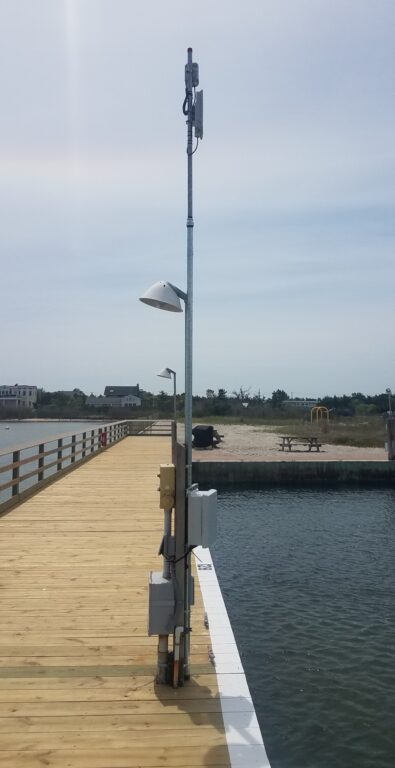
Our Marina Wi-Fi Antenna Worked Great for 20 Years. Why Is It Slow Now?
 |
A customer recently contacted us with a question we hear quite often:
The short answer? Yes. Technology has changed dramatically over the last two decades. The Problem Isn’t Always Your InternetMany marina owners assume they need a faster internet connection when guests begin complaining about Wi-Fi. In reality, the internet connection is often not the bottleneck. The original GNS-1485 was built around 2.4 GHz 802.11N technology and a high-gain sector antenna. For its time, it was an excellent solution for providing Wi-Fi coverage to boats, docks, and waterfront facilities. However, guest expectations in 2026 are much different than they were in 2001. Today’s boaters are:
A system designed for email and light web browsing can quickly become overwhelmed. |
Why Older Marina Wi-Fi Systems Slow Down
Several factors contribute to poor performance:
1. Everyone Is Sharing 2.4 GHz
The 2.4 GHz band is crowded.
Bluetooth devices, neighboring Wi-Fi networks, cameras, smart devices, and countless other products all compete for the same limited spectrum.
As more devices connect, performance drops.
2. Older Wi-Fi Standards
The original GNS-1485 uses older Wi-Fi technology compared to modern Wi-Fi 6 access points.
Modern devices are designed to take advantage of newer wireless standards that deliver greater efficiency, better roaming, and higher throughput.
3. More Devices Per Boat
Twenty years ago a guest might connect a single laptop.
Today it’s common for one boat to have:
- Two phones
- A tablet
- A laptop
- A smart TV
- Streaming devices
Multiply that by dozens of slips and the load increases dramatically.
4. Coverage Does Not Equal Capacity
One of the biggest misconceptions in outdoor Wi-Fi is that if guests can “see” the Wi-Fi signal, the network is performing well.
Coverage and capacity are two different things.
A marina can have excellent signal strength and still deliver poor speeds because the access point simply cannot process the volume of traffic being generated.
The Recommended Upgrade
For most marina Wi-Fi upgrades, we recommend replacing older antenna-based hotspot systems with a modern outdoor access point.
GNS-7664-ELR
The GNS-7664-ELR is one of our most popular marina and campground access points.
Benefits include:
- Wi-Fi 6 (802.11AX)
- Dual-band operation (2.4 GHz and 5 GHz)
- Higher client capacity
- Cloud management
- Remote monitoring
- Better performance in congested environments
- Simplified installation with integrated antennas
GNS-XV2-23T
Another excellent option is the GNS-XV2-23T.
This commercial-grade outdoor Wi-Fi 6 access point provides:
- Dual-band Wi-Fi
- Enterprise-class performance
- Cloud management
- Superior roaming
- Excellent marina and waterfront coverage
- Fast deployment with an integrated omni-directional antenna
For many marina operators, installation is actually easier than maintaining older antenna-and-radio combinations.
What Kind of Improvement Can You Expect?
Every marina is different, but customers commonly see:
- Faster guest speeds
- Better streaming performance
- Improved reliability
- Fewer support calls
- Better handling of large numbers of connected devices
Most importantly, guests stop complaining about Wi-Fi.
And that’s usually the real goal.
Should You Upgrade?
If your marina Wi-Fi equipment is more than 5-7 years old, it’s worth evaluating.
If it’s 15-20 years old, you’re likely leaving significant performance on the table.
The good news is that modern outdoor Wi-Fi systems are easier to install, easier to manage, and far more capable than the equipment available when many marina networks were originally built.
Need Help Evaluating Your Marina Wi-Fi?
We design and supply complete marina Wi-Fi systems throughout the United States.
Whether you need to cover a few docks or an entire waterfront property, we can help determine whether your existing equipment can be upgraded or if a modern Wi-Fi 6 solution would provide a better long-term investment.
Call (877) 209-5152 or contact GNS Wireless for a free consultation.
When most people think about Wi-Fi performance, they immediately look at signal strength.
“I have full bars, so my Wi-Fi should work great.”
Unfortunately, that’s not always true.
One of the most important measurements in any wireless network is something called SNR, or Signal-to-Noise Ratio. In many cases, SNR is a better indicator of network health than signal strength alone.
At GNS Wireless, whenever we complete a Wi-Fi installation for a campground, RV park, marina, outdoor venue, or commercial property, one of the first things we monitor after devices begin connecting is the SNR of client devices.
Why?
Because SNR tells us whether the network is truly performing as designed.
What Is SNR?
SNR stands for Signal-to-Noise Ratio.
In simple terms, it measures how much stronger your desired Wi-Fi signal is compared to the unwanted radio noise around it.
Think of it like trying to have a conversation in a crowded restaurant.
If the person you’re talking to is much louder than the background noise, communication is easy.
If everyone around you is talking at the same volume, it becomes difficult to understand what is being said.
Wi-Fi works the same way.
- Signal = Your Wi-Fi network
- Noise = Interference from other wireless devices, neighboring networks, electronics, and environmental factors
The larger the difference between signal and noise, the better your Wi-Fi connection will perform.
Why Is SNR More Important Than Signal Strength?
A device may show a strong signal, but still experience:
- Slow internet speeds
- Buffering video streams
- Dropped Wi-Fi connections
- Poor VoIP call quality
- Failed roaming between access points
This often occurs because noise levels are too high.
For example:
Signal Strength: -55 dBm
Noise Floor: -85 dBm
SNR = 30 dB
This is excellent.
Now consider:
Signal Strength: -55 dBm
Noise Floor: -65 dBm
SNR = 10 dB
Even though the signal strength is identical, performance will be significantly worse.
What Is a Good SNR for Wi-Fi?
As a general rule:
| SNR Value | Network Quality |
|---|---|
| 40+ dB | Excellent |
| 30-40 dB | Very Good |
| 20-30 dB | Good |
| 15-20 dB | Fair |
| Below 15 dB | Poor |
| Below 10 dB | Unusable for most applications |
For campground Wi-Fi, RV park Wi-Fi, and marina Wi-Fi systems, we typically target 25 dB or higher throughout guest coverage areas.
This provides reliable support for:
- Streaming video
- Video calls
- Social media
- Remote work
- Smart devices
How Do You Check SNR?
Most professional wireless access points provide SNR readings directly within their management software.
Examples include:
- Cambium Networks
- Grandstream
- Ubiquiti
- EnGenius
- MikroTik
After a network is deployed and guests begin connecting, we review the connected client list and analyze:
- Signal strength
- SNR
- Channel utilization
- Client count
- Roaming behavior
This real-world data often tells us more than a pre-installation survey.
Why We Check SNR After a Campground Wi-Fi Installation
Designing a wireless network is only the first step.
Once guests begin connecting, actual usage patterns emerge.
At GNS Wireless, we review client SNR values after deployment to validate:
Access Point Placement
A low SNR in a specific area may indicate that an access point should be relocated or an additional access point added.
Channel Selection
Sometimes neighboring Wi-Fi networks create interference on a particular channel.
By analyzing SNR across multiple clients, we can determine whether changing channels will improve performance.
Antenna Coverage
Certain campsites or RV pads may receive weaker signal coverage than anticipated due to:
- Trees
- RV placement
- Metal structures
- Elevation changes
SNR data helps identify these problem areas.
Network Capacity
High client counts can increase noise levels and reduce overall wireless performance.
Reviewing SNR alongside client density helps optimize network design as the campground grows.
What Causes Poor SNR?
Several factors can reduce Wi-Fi Signal-to-Noise Ratio:
Neighboring Wi-Fi Networks
Common in:
- RV parks
- Campgrounds
- Marinas
- Mobile home communities
Every nearby network contributes to the wireless noise floor.
Non-Wi-Fi Interference
Sources include:
- Wireless cameras
- Bluetooth devices
- Microwave ovens
- Cordless phones
- Industrial equipment
Physical Obstacles
Materials that impact wireless signals:
- Metal buildings
- RV siding
- Shipping containers
- Dense tree coverage
- Concrete structures
Improper Channel Planning
When multiple access points use overlapping channels, interference increases and SNR decreases.
How to Improve Wi-Fi SNR
Improving SNR usually involves improving signal quality, reducing interference, or both.
Common solutions include:
- Relocating access points
- Adjusting transmit power
- Changing channels
- Adding additional access points
- Upgrading antennas
- Removing sources of interference
- Migrating clients to 5 GHz or Wi-Fi 6 capable equipment
SNR Is One of the Most Important Wi-Fi Metrics
Many network owners focus only on internet speed tests.
However, speed tests only show part of the picture.
A properly designed wireless network should also maintain healthy Signal-to-Noise Ratios throughout the coverage area.
At GNS Wireless, SNR is one of the primary metrics we review after every campground Wi-Fi installation, RV park Wi-Fi deployment, marina Wi-Fi project, and outdoor wireless network build.
By monitoring SNR, we can verify proper access point placement, optimize wireless channels, reduce interference, and ensure guests receive the reliable Wi-Fi experience they expect.
If your campground Wi-Fi, RV park Wi-Fi, or outdoor wireless network isn’t performing as expected, reviewing Signal-to-Noise Ratio may quickly reveal the root cause.