
Dead Zones and Guest Complaints? How to Eliminate Wi-Fi Blackouts at Your RV Park or Campground
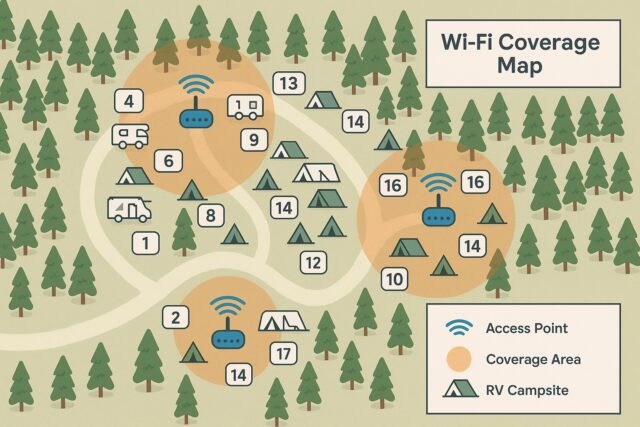
🌲 Guests Came for the Outdoors—But Expect Solid Wi-Fi Too
If you’re running a campground or RV park in 2025, you already know the modern guest brings more than a backpack—they bring smartphones, smart TVs, tablets, and remote work setups. And when Wi-Fi fails? So do your reviews.
One of the top complaints in online feedback:
❌ “No Wi-Fi in our cabin.”
❌ “Couldn’t stream anything at night.”
❌ “Had to walk to the front office to check emails.”
The culprit? Wi-Fi dead zones — and they’re hurting your business.
📍 What Causes Wi-Fi Dead Zones in Campgrounds?
Campgrounds are beautiful—but they’re also tricky environments for wireless coverage.
Here’s what gets in the way:
-
🌲 Trees and terrain blocking line of sight
-
🧱 Concrete or metal buildings interfering with signal
-
🧭 Access points placed too far apart
-
📶 Consumer-grade gear not built for outdoor use
-
📉 No heat map planning, just guesswork
Even large parks with strong backhaul can have patchy service without the right layout.
👎 Dead Zones = Bad Reviews + Fewer Bookings
Here’s the truth:
Guests expect campground Wi-Fi to work just like it does at home.
“We booked a week-long stay but had to leave early. The kids couldn’t stream and I couldn’t get any work done.” – Recent 1-star review on Google
For families, remote workers, and seasonal guests, poor Wi-Fi can be a deal breaker. Every blacked-out cabin or campsite risks a negative review.
✅ How GNS Wireless Fixes Wi-Fi Dead Zones—Fast
You don’t need to rebuild your entire network. You need smart upgrades and strategic design.
Here’s how we do it:
-
📍 Free Heat Mapping & Site Surveys
We map your property and identify weak spots before we make any changes. -
🚀 High-Power, Outdoor-Rated Access Points
Dual-band Wi-Fi 6 APs with directional and omni antennas, ready for trees, heat, and humidity. -
🧠 Mesh or Point-to-Point Expansion
Seamless coverage from the lodge to the fire pit—no matter the distance. Zero Interference Point to Point Wireless Bridge. -
🛠️ Pre-Configured Gear, Ready to Install
We ship systems set up for plug-and-play deployment with easy diagrams and phone support. -
📡 Specialized Solutions for Remote or Hard-to-Reach Zones
Including solar power options and wireless bridges to extend signal without trenching cables.
🗣️ Real-World Success: No More Dead Spots at Whispering Pines Campground
“Our lodge and bathhouse were completely out of range. GNS Wireless came in with a custom plan, mounted two directional antennas, and it’s been rock solid ever since. Now we can stream Netflix in the cabins and take mobile bookings without a hitch.”
— Susan T., KOA Partner Campground
🛑 Stop Losing Guests to Wi-Fi Dead Zones
Dead spots don’t just annoy guests—they cost you revenue, bookings, and reputation.
📞 Let GNS Wireless fix your network before peak season hits.
✅ Get your FREE site survey and custom quote today.
Contact Us » or call 877-209-5152
📝 Bonus Download:
“5 Places Dead Zones Hide in Your Campground (And How to Fix Them)”
→ Free checklist PDF available upon request!
Today’s boaters expect fast, dependable Wi-Fi at your marina — and if you don’t deliver, someone else will.
Here’s a quick checklist to make sure your marina network is ready to keep guests connected:
✅ Start with a Strong Internet Backbone
Use high-speed fiber or cable at the marina office. Everything builds from here.
✅ Strategic Access Point Placement
Install outdoor-rated access points along docks, spaced every 200–300 feet, for consistent coverage across all slips.
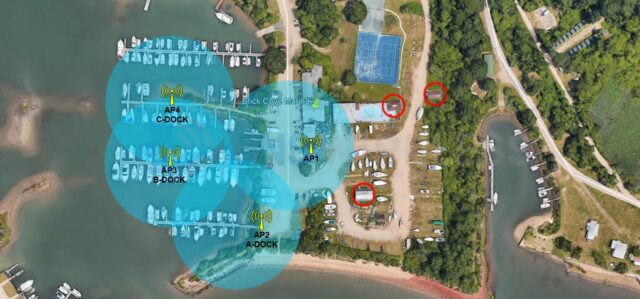
Important for Larger Vessels:
For marinas with bigger boats (40 feet and up), do not rely on an access point more than 100–125 feet away from the vessel.
-
Below deck, Wi-Fi signals must pass through fiberglass, electronics, and bulkheads.
-
Beyond 150 feet, the signal becomes too weak for reliable streaming, browsing, or calling.
-
On deck, where there’s line-of-sight, you can stretch distances a little more — ideal for smaller marinas with lighter traffic.
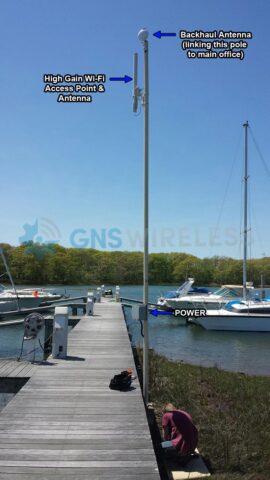
✅ Plan for Pole-Mounted Access Points: Power and Weatherproofing
|
 |
✅ Use Power Over Ethernet (PoE)
Simplify long dock installations by sending both power and data through a single Ethernet cable.
✅ Weatherproof, Marine-Ready Equipment
Choose access points and antennas built specifically for outdoor, high-humidity, salt-air conditions. If not, guaranteed your equipment will fail after a few short seasons.
✅ Secure Guest Access Management
Offer a guest Wi-Fi portal that manages logins, throttles bandwidth hogs, and improves security for your network. We offer customized backend management that provides an easy way to view, edit and troubleshoot the Wi-Fi.
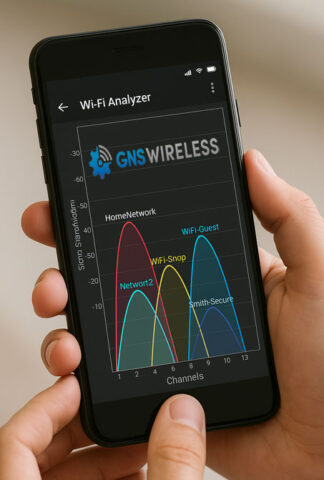 |
Bonus Tip:Test your Wi-Fi coverage before final mounting.
|
Ready to Upgrade?
At GNS Wireless, we specialize in complete marina Wi-Fi systems, including:
-
Fiber/Backhaul integration
-
Pre-configured PoE switches and weatherproof boxes
-
Pole-mount kits for clean, professional dock installs
-
Rugged, marine-rated wireless gear
📞 Talk to us today for a free site survey and marina Wi-Fi design consultation!
🔗 Request Your Custom Marina Wi-Fi Plan
Today’s boaters expect more than just a slip and a dock—they expect fast, reliable Wi-Fi wherever they tie up. Whether it’s for remote work, streaming, navigation apps, or staying in touch with family, marina Wi-Fi has become a must-have amenity.
If you’re a marina owner or operator, offering seamless wireless connectivity can set your facility apart and even bring in new revenue streams.
Here’s how to make sure your marina Wi-Fi doesn’t leave guests stranded.
Challenges Unique to Marina Wi-Fi
Designing a wireless network for a marina is very different from setting one up on land. Some key challenges include:
-
Coverage over Water: Wi-Fi signals weaken and reflect over water surfaces.
-
Long Distances: Docks and slips can stretch hundreds of feet from the main office or clubhouse.
-
Obstructions: Boats, masts, and weather conditions (like heavy rain) can block or weaken signals.
-
User Density: Seasonal peaks can overwhelm a weak or outdated network with hundreds of connected devices.
Without the right design, even the best equipment can fall short.
5 Keys to Building a Rock-Solid Marina Wi-Fi Network
1. Centralized Connection Point
Start with a wired fiber or high-speed cable connection at your main building. This acts as the “internet backbone” for your marina.
From there, install a high-powered access point near the marina entrance or main dock. This will serve as the central broadcast location.
2. Strategic Access Point Placement
Rather than trying to blast Wi-Fi from a single location, add outdoor-rated access points along docks and key areas.
Spacing is critical—access points should typically be mounted every 200–300 feet depending on layout and obstructions.
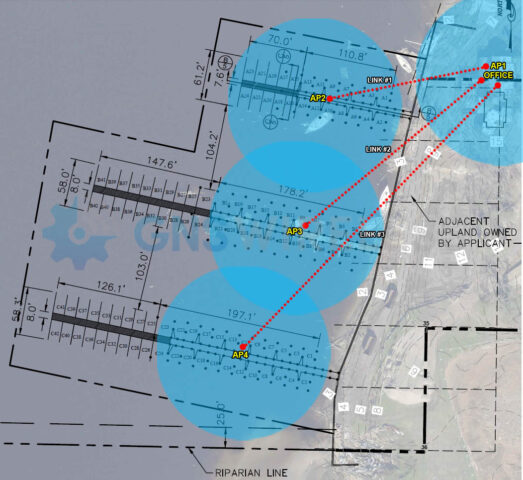
For example:
-
One AP near the fuel dock
-
One AP midway down the main dock (Only Power Required)
-
One AP by the end slips (Only Power Required)
- Use a 60 GHz PTP to link the main office to the remote APs
This creates a blanket of overlapping coverage, so boaters don’t drop connection as they move around.
3. Power Over Ethernet (PoE) is Your Friend
Running power separately to each AP can be expensive and complicated.
Instead, use PoE switches to send both power and data over the same Ethernet cable — cutting down installation time and cost.
4. Marine-Grade Hardware is Essential
Salt air, humidity, and changing temperatures are brutal on standard indoor equipment.
Choose ruggedized, outdoor-rated gear built for marine environments—weatherproof, UV-resistant, and capable of operating in extreme conditions.
5. User Access Management
Don’t just offer “open Wi-Fi.”
Use a guest portal to:
-
Control bandwidth (prevent a few users from hogging the connection)
-
Offer login options (free with a password, or premium paid tiers)
-
Collect emails or user information for marketing
-
Improve network security
Done correctly, this can turn your marina Wi-Fi from a free amenity into a revenue generator.
Real-World Results: Better Wi-Fi, Happier Boaters
Offering a reliable wireless connection not only improves boater satisfaction — it encourages longer stays, repeat customers, and glowing reviews.
Think about it: would you rather stay at a marina where you’re offline all weekend… or one where you can stream, work, and stay connected without hassle?
Investing in your Wi-Fi infrastructure is investing in the future of your marina.
Ready to Get Started?
At GNS Wireless, we specialize in building custom marina Wi-Fi solutions that are:
-
Scalable for future growth
-
Weatherproof and durable
-
Pre-configured for easy setup
-
Designed for maximum coverage and speed
Whether you manage a small 30-slip marina or a 500-slip mega-yacht harbor, we can tailor a solution that fits your needs and budget.
📞 Contact GNS Wireless today for a free site survey and consultation!
📧 Request your custom marina Wi-Fi quote here
Turn Great Stays into Rave Reviews with GNS Wireless
Outdoor adventure is booming in 2025. RV parks are full. Campgrounds are bustling. Marinas are thriving. But while people crave the outdoors, they expect one thing to stay connected: strong, reliable Wi-Fi.
Outdoor Wi-Fi for Campgrounds and Marinas
Whether it’s for remote work, streaming movies under the stars, posting that perfect sunset to Instagram, or checking weather updates, guests demand outdoor Wi-Fi. It’s no longer a luxury — it’s an expectation.
Without It?
Bad reviews. Lost bookings. Negative word-of-mouth. In a world where online ratings drive success, not offering reliable Wi-Fi could be costing you far more than you realize.
The Numbers Don’t Lie:
-
89% of travelers now consider Wi-Fi “essential” when choosing accommodations (source: Booking.com 2024 survey).
-
61% say they’d leave a negative review if Wi-Fi was poor.
-
73% of guests would extend their stay if the Wi-Fi met or exceeded their expectations.
Why GNS Wireless?
At GNS Wireless, we specialize in custom Wi-Fi solutions built specifically for RV parks, campgrounds, and marinas. Here’s why park owners across the U.S. trust us:
-
Free Site Surveys and Heat Mapping: We design a solution that fits your location, not a cookie-cutter package.
-
Outdoor-Rated Equipment: Built tough to handle rain, heat, salt air, and everything in between.
-
Seamless Guest Experience: Reliable signal coverage, even across large areas and waterfronts.
-
Proven Success: 20+ years of experience bringing outdoor Wi-Fi to life.
Real-World Success:
Last year, Seaside Harbor Marina in Florida struggled with constant guest complaints about Wi-Fi dead zones. After partnering with GNS Wireless, we implemented a custom wireless mesh system with dock-to-clubhouse coverage. Within 90 days, their guest satisfaction scores rose by 34%, and their seasonal bookings jumped 18%.
“We went from dreading tech complaints to hearing ‘Best marina Wi-Fi ever!’ almost every week.” — Dave W., Marina Owner
Visual Example:
Common Questions About Campground Wi-Fi:
Q: How long does a campground Wi-Fi installation take? A: Most installations are completed in as little as 2-4 days, depending on the size and complexity of your site.
Q: Is your Wi-Fi equipment waterproof and weather-resistant? A: Absolutely. All GNS Wireless outdoor systems are designed to withstand rain, heat, salt air, and extreme temperatures.
Q: Will I need a dedicated internet connection for my park? A: In most cases, yes. We can help evaluate your options and ensure bandwidth is distributed efficiently across your property.
What You Could Be Offering Your Guests:
-
High-speed internet for streaming, remote work, and online bookings.
-
Secure, managed networks with branded guest login portals.
-
Reliable connectivity for mobile apps, digital maps, payments, and smart devices.
Don’t Let Connectivity Hold Your Business Back.
✅ Get a Free Wi-Fi Site Survey Today!
Visit GNSWireless.com or call 877-209-5152 to speak with a Wi-Fi expert. We’ll help you design a custom, affordable solution — and help you turn good stays into great reviews.
✨ BONUS: Ask about our FREE “Campground Wi-Fi Readiness Checklist” and start planning your upgrade!
GNS Wireless | Outdoor Wi-Fi Experts | 20+ Years Strong
#CampgroundWiFi #OutdoorInternet #MarinaWiFi #GNSWireless #WiFiSolutions2025
Learn more:
-
Wi-Fi for campgrounds 2025
-
Marina Wi-Fi solutions
-
Outdoor wireless networks for parks
-
Campground guest Wi-Fi systems
-
RV park Wi-Fi installation
-
Outdoor Wi-Fi access points
-
Reliable campground internet
-
Free Wi-Fi survey for marinas and campgrounds
🧠 Your Wi-Fi Is Not Haunted. You Just Need Better Coverage (and Maybe GNS Wireless)
Let’s paint a picture: You’re standing in your kitchen, coffee in hand, trying to stream a video or check emails. The Wi-Fi drops. Again.
You take a deep breath, walk three feet into the hallway—boom. Internet’s back. Take one step back—dead zone. What is this, a tech poltergeist?
Spoiler: it’s not ghosts. It’s your Wi-Fi. More specifically, your Wi-Fi coverage.
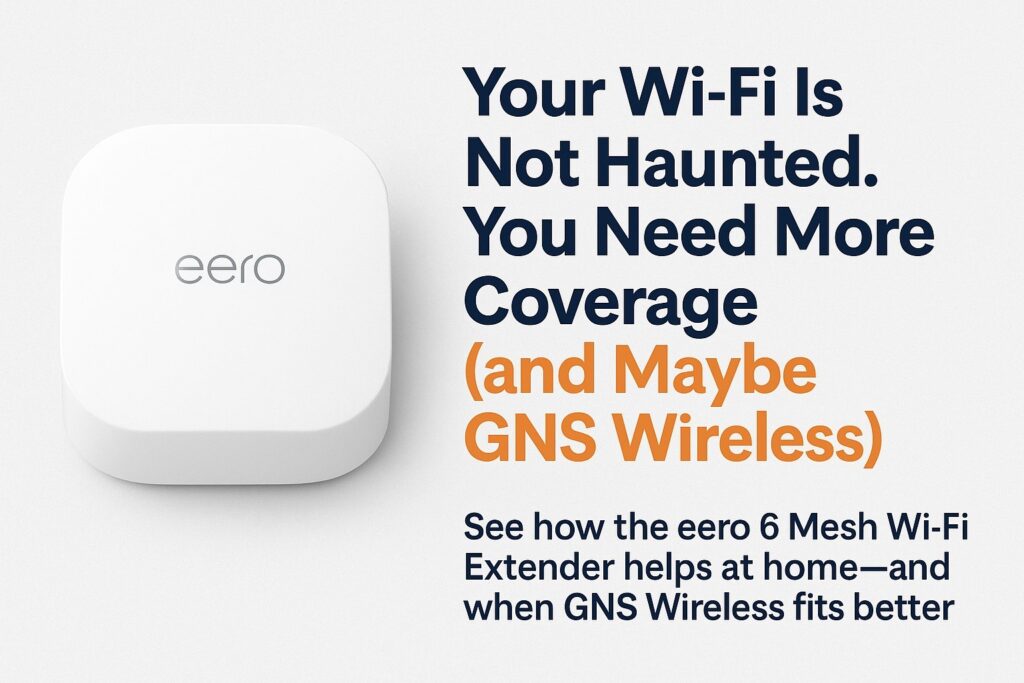
And that’s where the eero 6 Mesh Wi-Fi Extender comes in.
See below for eero 6 mesh Wi-Fi extender setup help
🏡 What the Heck Is an eero 6 Mesh Extender—and Why Does It Work?
In short: the eero 6 is like a loyal sidekick for your main router. It takes the signal from your existing eero system and stretches it further, giving you up to 1,500 sq. ft. of extra coverage with the latest Wi-Fi 6 technology.
No more buffering in the bathroom. No more Zoom calls from the garage that sound like you’re on the moon.
✨ What Makes It Awesome?
-
Plug it in. That’s literally it.
-
Works with Alexa (ask her to reboot your network hands-free)
-
Dual-band Wi-Fi 6 = smoother streams, faster uploads, and more devices supported
-
Self-updating firmware to keep things secure and snappy
It’s sleek. It’s affordable. And for the average household with a few dead spots—it’s a total game changer.
⚠️ But Here’s the Catch: Not Everything Can Be Fixed with a Plug-In Box
Let’s be real—not every Wi-Fi problem lives inside your house.
You can stack 10 eero 6s like Jenga blocks and still not get a signal out to:
-
Your detached workshop
-
The barn out back
-
The RV parked 500 feet away
-
That fancy new pool cabana you built for “remote work” (we see you…)
“I tried extending Wi-Fi to my guest house with a mesh system. Let’s just say my guests now bring data plans.” – Actual customer before calling GNS Wireless
This is where consumer mesh systems hit their limit—and where GNS Wireless steps in like the tech cavalry.
🧭 So… Who’s GNS Wireless and Why Should I Care?
We’re the people who fix the Wi-Fi problems you can’t fix with a gadget from Amazon.
Commercial-grade solutions. Rugged outdoor access points. Wireless bridges that shoot internet across fields, rivers, and even parking lots.
You’ve got a farm, RV park, marina, warehouse, or multi-building setup? We’ve got the blueprint, the hardware, and the tech support to bring the internet anywhere you need it.
Real Talk:
-
Trying to get internet from your house to a garage 900 ft away?
→ You need a Point-to-Point Wireless Bridge, not an eero. -
Want your campground guests to stream Netflix from their tents without rage-quitting?
→ You need outdoor Wi-Fi access points, weatherproof enclosures, and PoE kits. -
Looking for a plug-and-play system that actually works out-of-the-box?
→ We’ll preconfigure it before it ships.
🧰 eero 6 vs. GNS Wireless — Which One Do You Need?
| Situation | eero 6 Mesh Extender | GNS Wireless Solution |
|---|---|---|
| Wi-Fi dead spots in your home | ✅ Perfect fit | 🚫 Overkill |
| Internet to a guest house 800ft away | 🚫 Nope | ✅ Wireless Bridge |
| Outdoor Wi-Fi for RV parks or marinas | 🚫 Nope | ✅ Hardened Access Points |
| Need help planning and installing? | ❌ You’re on your own | ✅ We help you plan it all |
📞 Still Not Sure? Let’s Chat.
Whether you’re dealing with a frustrating dead zone in your home, or you’re trying to beam fast internet to a metal building a quarter-mile away—you’ve got options.
➡️ Start simple with an Amazon eero 6 for indoor fixes.
➡️ But when it’s bigger, more rugged, and way more important—that’s a job for GNS Wireless.
📧 support@gnswireless.com
📞 877-209-5152
🔗 See Outdoor Wi-Fi Solutions »
✨ Final Thought: Wi-Fi Problems Don’t Fix Themselves
It’s easy to blame the weather, your ISP, or your dog chewing on a cable. But the truth is: coverage, equipment, and planning matter.
The eero 6 Mesh Wi-Fi Extender is a smart start.
But when you want something stronger, longer range, and built for the outdoors, GNS Wireless has your back.
Let’s get your whole property online—not just the living room.
How we can help:
-
best Wi-Fi extender for dead zones
-
how to extend Wi-Fi to garage or barn
-
mesh Wi-Fi vs point-to-point wireless
-
improve Wi-Fi in detached building
-
GNS Wireless outdoor Wi-Fi solutions
-
eero 6 setup and alternatives for large properties
-
Wi-Fi for campgrounds and outdoor spaces